
Human Face Surface
Loading the math board and drawing, please wait…
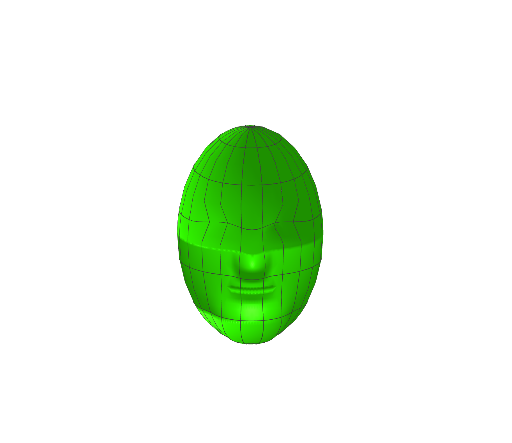
This example demonstrates how to use GeoGebra to draw a human face surface. It involves surface continuity, pyramid structure, and the application of step functions. By adjusting parameters a, b, c, d, p, f, g, h, you can observe changes in the face surface. Suitable for high school mathematics education, particularly in coordinate geometry and solid geometry.
GeoGebra Commands & Parameters
Surface((((10 * cos(u)) * cos(v)) * g(u, v)), (((8 * sin(u)) * cos(v)) * g(u, v)), (12 * sin(v)), u, (-π), π, v, -1.5708, 1.5708) → h
AI Drawing Prompt Reference
Draw a human-face surface as a single continuous parametric surface. Use parameters u in the range −π to π and v in the range −1.5708 to 1.5708. Define the surface in 3D by x=(10·cos(u)·cos(v))·g(u,v), y=(8·sin(u)·cos(v))·g(u,v), and z=12·sin(v), where the same function g(u,v) modulates the overall shape for continuity. Construct the face-like surface with this shared modulation and allow adjusting parameters (including those inside g) to observe how the surface changes.
The prompt above was compiled from the original drawing commands and is for reference only.