
Coffee Cup 2D-3D Model
Loading the math board and drawing, please wait…
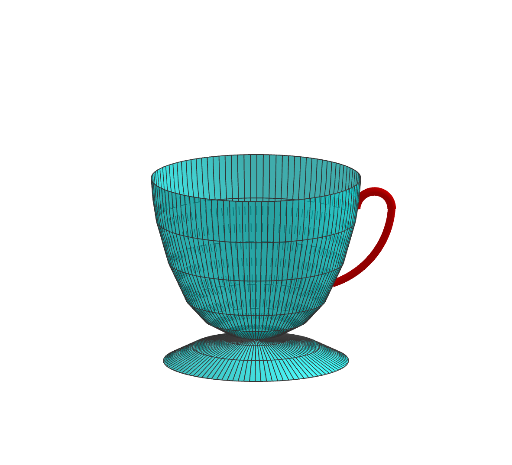
This example demonstrates how to generate a 3D coffee cup model by rotating a 2D shape. It involves core mathematical concepts such as solid geometry, rotation, function graphing, and coordinate geometry. Key GeoGebra commands and objects used in the construction include CircumcircleArc, Surface, Rotate, Point, and PointIn. Suitable for high school students learning solid geometry, function graphing, and 3D modeling.
GeoGebra Commands & Parameters
CircumcircleArc(C, D, E) → cCircumcircleArc(E, F, G) → dCircumcircleArc(C, H, I) → eSurface(c, 360°, yAxis) → aSurface(d, 360°, yAxis) → bSurface(e, 360°, yAxis) → fRotate(a, 90°, xAxis) → a'Rotate(b, 90°, xAxis) → b'Rotate(f, 90°, xAxis) → f'Point(d) → APoint(d) → BRotate(A, 90°, xAxis) → A'Rotate(B, 90°, xAxis) → B'PointIn(g) → JPointIn(g) → KCircumcircleArc(A', J, K) → hPointIn(g) → LCircumcircleArc(K, L, B') → k
AI Drawing Prompt Reference
Draw a 3D coffee cup model created by rotating two circles. The circles represent the bottom and the body of the cup. Ensure the shape is symmetric and the cup opening is clearly visible.
The prompt above was compiled from the original drawing commands and is for reference only.