
Holed Torus Construction
Loading the math board and drawing, please wait…
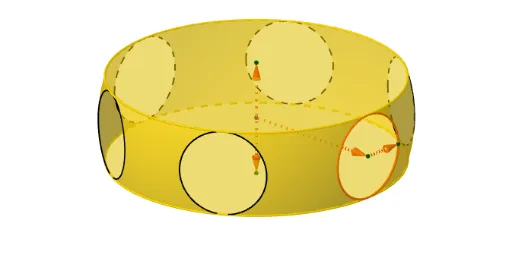
This example demonstrates the construction and visualization of a three-dimensional torus with circular holes. It involves core mathematical concepts such as solid geometry, circles, trigonometry, vectors, and parametric equations. The construction utilizes GeoGebra commands and objects like Segment, Point, Max, Min, Line, Vector, Length, Surface, CurveCartesian, Sequence, Circle, and Textfield. It is suitable for high school students and math enthusiasts studying solid geometry and parametric modeling.
GeoGebra Commands & Parameters
Segment((0, 0, π / 2), (0, 0, ((-π)) / 2)) → segInfSupPoint(segInfSup) → P2Point(segInfSup) → P1Max(z(P1), z(P2)) → vMaxMin(z(P1), z(P2)) → vInfPoint(yAxis) → ALine(A, A + (1, 0, 0)) → rOp2Point(rOp2) → BVector(A, B) → v2Length(v2) → r1Vector(A) → vLength(v) → rSurface((((cos((s * f(t))) * r1) * cos(t)) + (sin((s * f(t))) * r), (((-sin((s * f(t)))) * r1) * cos(t)) + (cos((s * f(t))) * r), (r1 * sin(t))), t, vInf, vMax, s, 0, (2 * π / n)) → parteSuperficieCurveCartesian(((r1 * cos(t)), r, (r1 * sin(t))), t, (-π), π) → circ1TSequence(Rotate[circ1T, ((t * 360 / n))°, zAxis], t, 0, n - 1) → CircSequence(Rotate[parteSuperficie, ((t * 360 / n))°, zAxis], t, 0, n - 1) → supCircle((0, 0, r1), r, zAxis) → Tapa1Textfield(n) → CasillaDeEntrada1Vector(P1) → vAVector(P2) → vB