
Gothic Art with Tangent Circles
Loading the math board and drawing, please wait…
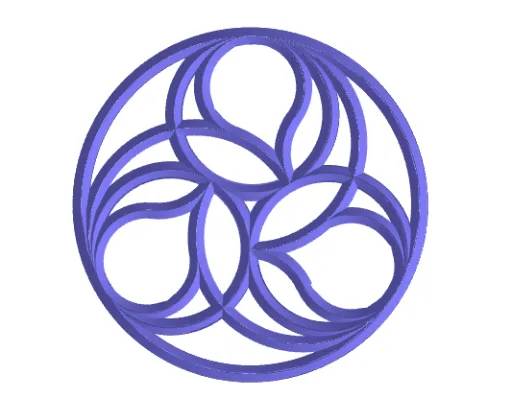
This GeoGebra example demonstrates Gothic art style through tangent circles. Key mathematical concepts include circles, tangency, symmetry, and geometric construction. It uses commands such as sequence, midpoint, line segment, circle, and rotation. Suitable for high school mathematics education, particularly in geometry and coordinate geometry.
GeoGebra Commands & Parameters
Sequence(Rotate[A, (ang * t), Centro], t, 0, nLados - 1) → PtosElement(Ptos, 2) → BMidpoint(B, A) → M1LineBisector(B, A) → mediatrizPoligonoUnitVector(mediatrizPoligono) → v2OrthogonalVector(v2) → v2PerpDistance(Centro, B) → rDistance(A, B) → rC1Circle(M1, grosorUsar, v2Perp) → circ2Midpoint(M1, M2) → CM1M2Line(CM1M2, CM1M2 + (0, 0, 1)) → eje3CircleArc(CM1M2, M1, M2) → t2previoCircle(B, rC1 / 2) → t1Rotate(t1, ang, Centro) → circAux2If(nLados ≤ 3, M2, Intersect[circAux2, t2previo, 1]) → PAuxLimiteCircunferenciaIf(nLados ≤ 3, 180°, Angle[M1, CM1M2, PAuxLimiteCircunferencia]) → angAuxSemicircunferenciaLine(Centro, Centro + (0, 0, 1)) → eje1Line(Centro, B) → r1_1UnitVector(r1_1) → v1OrthogonalVector(v1) → v1PerpCircle(M, grosorUsar, v1Perp) → circ1Distance(CM1M2, M1) → rc4Circle(Centro, M) → t3Segment(A, B) → lSegment(B2, CM1M2) → auxCircTangente1LineBisector(auxCircTangente1) → mediatrizTangente1Intersect(r1_1, mediatrizTangente1) → B3CircleArc(CM1M2, M1, PAuxLimiteCircunferencia) → t2Circle(B3, M) → c2Intersect(t2previo, c2, 1) → FDistance(B3, M) → rC2LineBisector(B3, M3) → mediatrizTangente2Intersect(mediatrizPoligono, mediatrizTangente2) → CCircle(C, M1) → c3Intersect(c2, c3, 1) → DCircleArc(B3, D, F) → t5CircleArc(C, D, M1) → t4Line(B, B + (0, 0, 1)) → eje2Surface(circ1, (desarrollaToro * 360°), eje2) → toro2Angle(D, B3, F) → angulo5Line(B3, B3 + (0, 0, 1)) → ejeB3OrthogonalVector(Vector[B3, D]) → v3PerpCircle(D, grosorUsar, v3Perp) → circ3Surface(circ3, (desarrollaToro * angulo5), ejeB3) → toro4Line(C, C + (0, 0, 1)) → ejeCAngle(D, C, M1) → angulo6Surface(circ2, (desarrollaToro * angAuxSemicircunferencia), eje3) → toro3Surface(circ3, (desarrollaToro * angulo6), ejeC) → toro5Surface(circ1, (desarrollaToro * 360°), eje1) → toro1Sequence(Rotate[conjuntoTorosIniciales, (ang * t), Centro], t, 0, nLados - 1) → cTorosPolygon(Ptos) → polTextfield(nLados) → CasillaDeEntrada1Segment(CM1M2, M2) → segAuxRadioASegment(M, B2) → fSegment(Centro, M) → auxCircTangente2Segment(B3, M3) → gSegment(B3, M) → segAux1Tangente2Segment(M3, M1) → segAux2Tangente2Ray(M3, M1) → hSequence(Rotate[cLineas, (ang * t), Centro], t, 0, repeticionesVistas - 1) → cLineasBPolyLine({PTrig1, Rotate[PTrig1, 120°, M, v1Perp], Rotate[PTrig1, 240°, M, v1Perp], PTrig1}) → Trig1Surface(Trig1, (desarrollaToro * 360°), eje1) → toroRecto1PolyLine({PTrig2, Rotate[PTrig2, 120°, M1, v2Perp], Rotate[PTrig2, 240°, M1, v2Perp], PTrig2}) → Trig2PolyLine({PTrig3, Rotate[PTrig3, 120°, D, v3Perp], Rotate[PTrig3, 240°, D, v3Perp], PTrig3}) → Trig3Surface(Trig1, (desarrollaToro * 360°), eje2) → toroRecto2Surface(Trig2, (desarrollaToro * angAuxSemicircunferencia), eje3) → toroRecto3Surface(Trig3, (desarrollaToro * angulo5), ejeB3) → toroRecto4Surface(Trig3, (desarrollaToro * angulo6), ejeC) → toroRecto5Sequence(Rotate[conjuntoTorosRectosIniciales, (ang * t), Centro], t, 0, nLados - 1) → cTorosRectosPolygon(E, G, 4) → polígono1, i, j, k, m, H, I