
Steinbach Helix and Catenoid
Loading the math board and drawing, please wait…
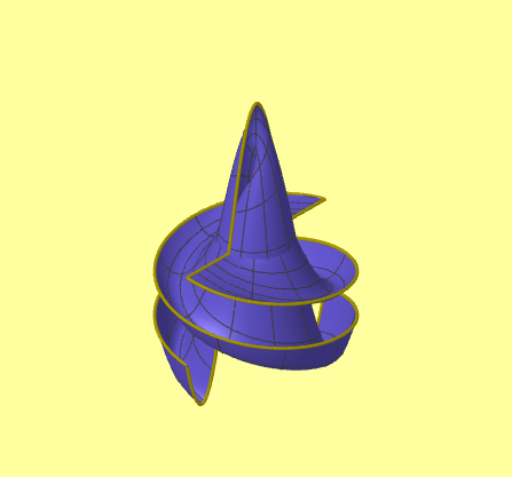
This example demonstrates the Steinbach helix, catenoid, and their relationship with the helicoid. It involves core mathematical concepts like parametric equations, surface generation, and geometric transformations. Constructed using commands such as Line, Point, Ray, Surface, and CurveCartesian, it is suitable for high school students and math enthusiasts studying surface geometry and parametric equations.
GeoGebra Commands & Parameters
Line((0, 0, 0), (0, 0, -1)) → segSepPoint(segSep) → POrigenRay(POrigen, POrigen + (0, 0, -1)) → segSep2Textfield(vmin) → CasillaDeEntrada4Textfield(umax) → CasillaDeEntrada5Textfield(gCurva) → CasillaDeEntrada7Textfield(gSuperficie) → CasillaDeEntrada8Textfield(colSup) → CasillaDeEntrada9Textfield(colCurva) → CasillaDeEntrada10Textfield(n) → CasillaDeEntrada1Textfield(desarrolloVer) → CasillaDeEntrada11Textfield(colFondo) → CasillaDeEntrada12Surface((u * cos(v)), (u * sin(v)), zInc + v + ((v * k) * (cos(u) - 1)), v, 0, vmax, u, -4, 4) → supCurveCartesian((u * cos(vmax)), (u * sin(vmax)), zInc + vmax + ((vmax * k) * (cos(u) - 1)), u, -4, 4) → curva1CurveCartesian(((-umax) * cos(v)), ((-umax) * sin(v)), zInc + v + ((v * k) * (cos((-umax)) - 1)), v, 0, vmax) → borde2CurveCartesian((umax * cos(v)), (umax * sin(v)), zInc + v + ((v * k) * (cos(umax) - 1)), v, 0, vmax) → bordeCurveCartesian((u * cos(0)), (u * sin(0)), zInc + 0 + ((0 * k) * (cos(u) - 1)), u, -4, 4) → borde3
AI Drawing Prompt Reference
Draw the Steinbach helix and catenoid. Start by drawing a vertical line along the z-axis and create a point at the origin. Define the parameter ranges and use parametric equations to draw the helix and catenoid. Fill the catenoid with different colors and draw the helix. The helix and catenoid revolve around the z-axis, with the helix above the catenoid.
The prompt above was compiled from the original drawing commands and is for reference only.