
Tessellation of the Plane Based on Napoleon's Theorem
Loading the math board and drawing, please wait…
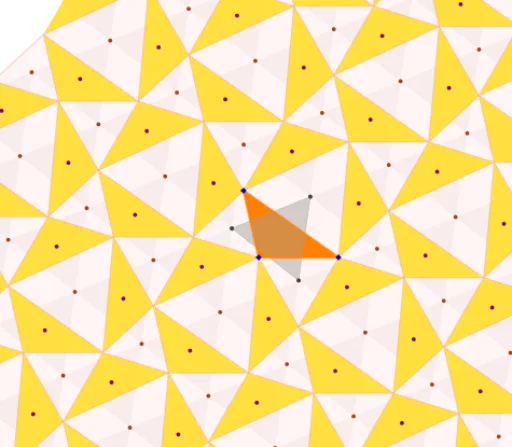
① This example demonstrates how to tessellate the entire plane using any arbitrary triangle, based on Napoleon's theorem, by constructing equilateral triangles on its sides. ② Core mathematical concepts include Napoleon's theorem (the centers of equilateral triangles erected on the sides of any triangle form an equilateral triangle), plane tessellation, properties of equilateral triangles, centroid (barycenter), and iterative transformations. ③ Construction highlights: using GeoGebra commands such as Polygon to create the initial triangle, Centroid to compute centroids, Vector to define translation vectors, Zip and Sequence to generate iterative sequences, Length to control side lengths, and Intersect to find intersection points; key objects include the initial triangle TInicial, equilateral triangle Equilatero, translation vector v1, iteration count iter, point sets PuntosA and CentrosA, etc., producing a tessellation pattern through iteration. ④ Suitable for high school and above, useful for exploring geometric theorems and tessellation art, as well as for math experiments or computer-assisted geometry teaching.
GeoGebra Commands & Parameters
Polygon(A, B, C) → TInicial, c, a, bPolygon(A, C, 3) → polígono1, f, g, h, DPolygon(C, B, 3) → polígono2, i, j, k, EPolygon(B, A, 3) → polígono3, l, m, n, FCentroid(polígono3) → GCentroid(polígono1) → HCentroid(polígono2) → IPolygon({G, I, H}) → EquilateroVector(F, C) → v1Zip(Polygon[{Rotate[A, ((120 * n))°, H], Rotate[B, ((120 * n))°, H], Rotate[C, ((120 * n))°, H]}], n, {-1, 0, 1}) → TrVector(B, D) → v2Sequence(Sequence[Translate[PuntosA, Vector[(t * v1) + (s * v2)]], t, (-iter), iter], s, (-iter), iter) → PuntosZip(Polygon[Rotate[G, ((120 * n))°, H], Rotate[I, ((120 * n))°, H], Rotate[H, ((120 * n))°, H]], n, {-1, 0, 1}) → EquilBSequence(Sequence[Translate[EquilB, Vector[(t * v1) + (s * v2)]], t, (-iter), iter], s, (-iter), iter) → EquilaterosSequence(Sequence[Translate[Tr, Vector[(t * v1) + (s * v2)]], t, (-iter), iter], s, (-iter), iter) → Tr2bLength(Tr2b) → TotalTrigCentroid(TInicial) → Centro1Zip(Rotate[Centro1, ((120 * n))°, H], n, {-1, 0, 1}) → CentrosASequence(Sequence[Translate[CentrosA, Vector[(t * v1) + (s * v2)]], t, (-iter), iter], s, (-iter), iter) → CentrosSequence(Sequence[Translate[PolLados, Vector[(t * v1) + (s * v2)]], t, (-iter), iter], s, (-iter), iter) → TrLadosVector(A, E) → v3Intersect(Segment[F, C], Segment[B, D]) → PFermat
AI Drawing Prompt Reference
Start with an arbitrary triangle. Construct equilateral triangles outward on each of its three sides. Take the centroids of these three equilateral triangles; they form another equilateral triangle. Use vectors from a vertex of the original triangle to a vertex of an adjacent equilateral triangle as translation directions. Translate the original triangle, the three equilateral triangles, and their centroids repeatedly along these two vectors to tile the entire plane. Also rotate the centroid of the original triangle by 120 and 240 degrees around one of the equilateral triangle centroids, and translate these rotated centroids with the pattern. The final tessellation covers the plane with the original triangle, equilateral triangles, centroids, and a grid of translations.
The prompt above was compiled from the original drawing commands and is for reference only.