
Hinged Dissection Trapezoid-Trapezoid
Loading the math board and drawing, please wait…
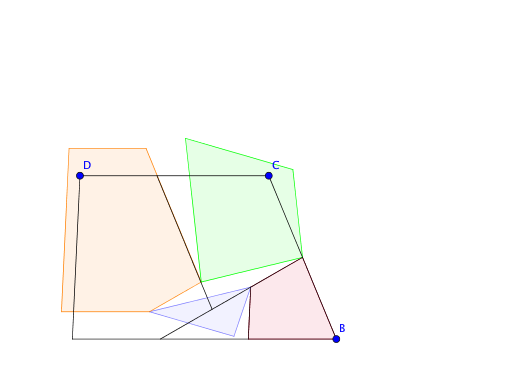
This example demonstrates how to transform one trapezoid into another using hinged dissection. Key mathematical concepts include geometric transformations and polygons. It utilizes commands such as Intersect, Segment, Ray, Midpoint, Dilate, Circle, Polygon, Rotate, and Translate in GeoGebra. Suitable for middle school and above students to learn about geometric transformations and properties of polygons.
GeoGebra Commands & Parameters
Intersect(xAxis, yAxis) → APoint(xAxis) → BSegment(A, B) → fSegment(A, D) → gLine(D, f) → hPoint(h) → ERay(D, E) → iPoint(i) → CSegment(D, C) → jSegment(C, B) → kMidpoint(k) → FDilate(A, 1 / 3, B) → A'Dilate(A, 2 / 3, B) → A'_1Segment(F, A'_1) → lLine(A', g) → mIntersect(m, l) → GCircle(F, Segment[G, A'_1]) → cIntersect(c, l, 1) → HLine(H, k) → n_1Segment(G, A') → pIntersect(n_1, j) → ISegment(I, H) → qPolygon(H, I, C, F) → poly1, h_1, i_1, c_1, f_1Polygon(H, I, D, A, A'_1) → poly2, h_2, i_2, d, a, a'_1Polygon(A'_1, A', G) → poly3, g_1, a'_2, a'Polygon(A', G, F, B) → poly4, a'_3, g_2, f_2, bRotate(A'_1, ((-n) * π), G) → JRotate(A', ((-n) * π), G) → A''Rotate(G, ((-n) * π), G) → G'Polygon(J, A'', G') → poly3', g', j_1, a''Translate(H, Vector[A'_1, J]) → H'Translate(I, Vector[A'_1, J]) → I'Translate(D, Vector[A'_1, J]) → D'Translate(A, Vector[A'_1, J]) → A'_2Translate(A'_1, Vector[A'_1, J]) → KPolygon(H', I', D', A'_2, K) → poly2', h', i', d', a'_4, k_1Rotate(H, ((-n) * π), F) → H'_1Rotate(I, ((-n) * π), F) → I'_1Rotate(C, ((-n) * π), F) → C'Rotate(F, ((-n) * π), F) → F'Polygon(H'_1, I'_1, C', F') → poly1', h'_1, i'_1, c', f'
AI Drawing Prompt Reference
Draw a hinged dissection figure showing how one trapezoid transforms into another. Start by placing two points on the coordinate axes to form a base segment, then construct a trapezoid with an additional point on a ray. Mark the midpoint of one side and divide the base into thirds, connecting points to create internal segments. Use a circle centered at the midpoint to find an intersection point, then form four polygonal regions within the trapezoid. Rotate two of these polygons around a vertex by a variable angle, and translate the other two along a vector, resulting in four new polygons that reassemble into two trapezoids, illustrating the hinged dissection transformation.
The prompt above was compiled from the original drawing commands and is for reference only.