
Highlighted Multiplication Table Visualization
Loading the math board and drawing, please wait…
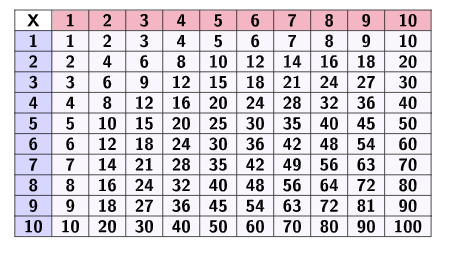
This example demonstrates a highlighted multiplication table using geometric shapes and text labels, making specific entries stand out visually while preserving the underlying numeric relationships. The main mathematical ideas include multiplication, structured presentation of discrete data, and mapping tabular values onto a plane through geometric layout and transformation-like organization. Construction focuses on GeoGebra commands and objects: Join to combine multiple graphical/text components into one coherent display, TableText to generate table-style numerical text at controlled positions, and Polygon to build the boundary/grid regions that serve as the container for the highlighted cells. The referenced objects (e.g., vertices/side components such as head, side, and labeled parameters; plus text elements like text1) work together with the table text to achieve the highlighted multiplication entries. Suitable for middle-school math instruction on number sense, interactive visualization in lessons, and GeoGebra demonstrations for learning how to combine geometric construction with dynamic or conditional text highlighting.
GeoGebra Commands & Parameters
Join({{"1"}, Sequence[a, a, 1, 10]}) → R1Join({{"2"}, Sequence[a, a, 2, 20, 2]}) → R2Join({{"3"}, Sequence[a, a, 3, 30, 3]}) → R3Join({{"4"}, Sequence[a, a, 4, 40, 4]}) → R4Join({{"5"}, Sequence[a, a, 5, 50, 5]}) → R5Join({{"6"}, Sequence[a, a, 6, 60, 6]}) → R6Join({{"7"}, Sequence[a, a, 7, 70, 7]}) → R7Join({{"8"}, Sequence[a, a, 8, 80, 8]}) → R8Join({{"9"}, Sequence[a, a, 9, 90, 9]}) → R9Join({{"10"}, Sequence[a, a, 10, 100, 10]}) → R10Join({{"x"}, Sequence[a, a, 1, 10]}) → HTableText(Join[{{"X"}, Sequence[a, a, 1, 10]}], Join[{{"1"}, Sequence[a, a, 1, 10]}], Join[{{"10"}, Sequence[a, a, 10, 100, 10]}], "c_|h", Join[{{"2"}, Sequence[a, a, 2, 20, 2]}], Join[{{"3"}, Sequence[a, a, 3, 30, 3]}], Join[{{"4"}, Sequence[a, a, 4, 40, 4]}], Join[{{"5"}, Sequence[a, a, 5, 50, 5]}], Join[{{"6"}, Sequence[a, a, 6, 60, 6]}], Join[{{"7"}, Sequence[a, a, 7, 70, 7]}], Join[{{"8"}, Sequence[a, a, 8, 80, 8]}], Join[{{"9"}, Sequence[a, a, 9, 90, 9]}]) → text1Polygon(A, B, C, D) → head, a, b, c, dPolygon(E, F, B, G) → side, e, f, b_1, gPolygon(I, J, K, L) → v1, i, j, k, lPolygon(I_1, J_1, K_1, L_1) → v2, i_1, j_1, k_1, l_1Polygon(I_2, J_2, K_2, L_2) → v3, i_2, j_2, k_2, l_2Polygon(I_3, J_3, K_3, L_3) → v4, i_3, j_3, k_3, l_3Polygon(I_4, J_4, K_4, L_4) → v5, i_4, j_4, k_4, l_4Polygon(I_5, J_5, K_5, L_5) → v6, i_5, j_5, k_5, l_5Polygon(I_6, J_6, K_6, L_6) → v7, i_6, j_6, k_6, l_6Polygon(I_7, J_7, K_7, L_7) → v8, i_7, j_7, k_7, l_7Polygon(I_8, J_8, K_8, L_8) → v9, i_8, j_8, k_8, l_8Polygon(I_9, J_9, K_9, L_9) → v10, i_9, j_9, k_9, l_9Polygon(M, N, O, P) → h1, m, n, o, pPolygon(M_1, N_1, O_1, P_1) → h2, m_1, n_1, o_1, p_1Polygon(M_2, N_2, O_2, P_2) → h3, m_2, n_2, o_2, p_2Polygon(M_3, N_3, O_3, P_3) → h4, m_3, n_3, o_3, p_3Polygon(M_4, N_4, O_4, P_4) → h5, m_4, n_4, o_4, p_4Polygon(M_5, N_5, O_5, P_5) → h6, m_5, n_5, o_5, p_5Polygon(M_6, N_6, O_6, P_6) → h7, m_6, n_6, o_6, p_6Polygon(M_7, N_7, O_7, P_7) → h8, m_7, n_7, o_7, p_7Polygon(M_8, N_8, O_8, P_8) → h9, m_8, n_8, o_8, p_8Polygon(M_9, N_9, O_9, P_9) → h10, m_9, n_9, o_9, p_9
AI Drawing Prompt Reference
Create a multiplication table visualization using geometric shapes and text labels to highlight specific entries while preserving the underlying numeric relationships. Start by generating a 10x10 grid of numbers, incrementing sequentially across rows and columns. Construct a grid framework using geometric polygons to enclose this number matrix. For each cell in the multiplication table, if its value is a multiple of a specific number (e.g., multiples of 9), emphasize it visually with distinct geometric shapes or colors. Finally, add numerical text labels at each grid intersection point to display the corresponding values, making the entire display both intuitive and mathematically informative.
The prompt above was compiled from the original drawing commands and is for reference only.