
Graph of Lengths of Line Segments
Loading the math board and drawing, please wait…
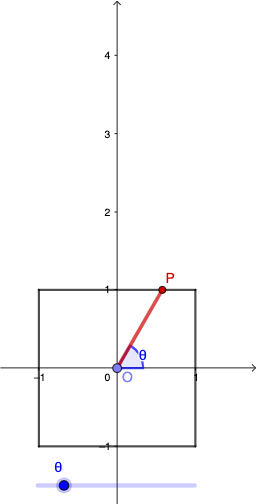
This example demonstrates the process of dynamically constructing line segments, calculating their lengths, and plotting the resulting function graph. Key mathematical concepts include line segment length, function graphing, angles, rotation, and polygon construction. GeoGebra commands used in the construction are Segment, Point, Intersect, Rotate, Angle, Ray, and Polygon. It is suitable for high school students to learn about the integration of function graphs and geometric constructions.
GeoGebra Commands & Parameters
Segment(A, D) → fSegment(D, C) → gSegment(C, B) → hSegment(B, A) → iPoint(yAxis) → OIntersect(h, xAxis) → FRotate(F, θ, O) → F'Angle(F, O, F') → βRay(O, F') → jIntersect(h, j) → GPolygon(O, G, F) → t1, f_1, e, g_1Intersect(i, j) → PPolygon(P, B, F, O) → q1, h_1, b, f_2, e_1Intersect(f, j) → IPolygon(I, O, F, B, A) → poly1, i_1, e_2, f_3, b_1, aIntersect(g, j) → JPolygon(J, D, A, B, F, O) → poly2, j_1, d, a_1, b_2, f_4, e_3Polygon(O, G, C, D, A, B, F) → poly3, e_4, g_2, c, d_1, a_2, b_3, f_5Segment(I, O) → kSegment(K, Q) → lSegment(L, Q) → mSegment(M, Q) → nSegment(N, Q) → pSegment(P, O) → qSegment(I, O) → rSegment(O, J) → sSegment(O, G) → t
AI Drawing Prompt Reference
Draw a square with four line segments AB, BC, CD, and DA. Construct a triangle with BC as the base by rotating and calculating angles, and connect the triangle's vertices with the square's vertices to form multiple polygons. Finally, draw the edges of these polygons, including line segments AB, BC, CD, DA, EF, FG, GH, HI, IJ, JK, KL, LM, MN, NO, OP, PQ, QR, RS, and ST.
The prompt above was compiled from the original drawing commands and is for reference only.