
Geometry of a Prism from Intersecting Planes
Loading the math board and drawing, please wait…
In collections
MEI Tasks for FM (8) – Vectors: Intersection of 3 planes
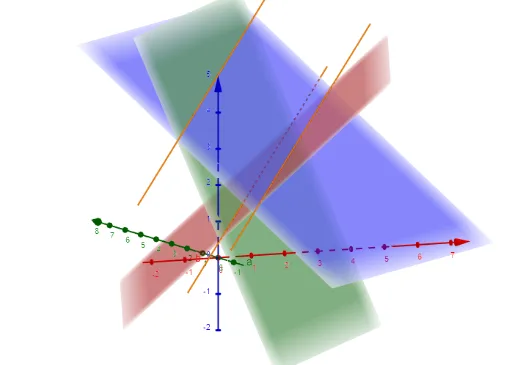
This example demonstrates how to construct a prism-like solid by combining multiple planes, revealing the resulting 3D structure and its defining edges/face boundaries under given geometric conditions. The main mathematical ideas are solid geometry (prisms and polyhedral construction), intersection relationships between geometric entities (planes/paths), and algebraic evaluation using determinants to capture or verify key geometric constraints. In the GeoGebra construction, it specifically uses the commands Determinant and IntersectPath together with constructed objects such as M, d, c, b, a, f, g, and h. IntersectPath provides the intersection-driven geometric connections (the paths/lines that emerge from plane relations), while Determinant supplies an algebraic quantity used in the construction logic or constraint checking. Suitable for high school advanced geometry, introductory university geometry, and for learners using dynamic geometry to connect algebraic tools with 3D modeling.
GeoGebra Commands & Parameters
Determinant(M) → dIntersectPath(a, b) → fIntersectPath(a, c) → gIntersectPath(b, c) → h
AI Drawing Prompt Reference
Create a 3D prism-like solid formed by three intersecting planes. Position the planes so that each pair intersects along a distinct line, producing three edges that define the prism's structure. Use a determinant value to verify the geometric constraints among the planes, ensuring they enclose a valid polyhedron. The final image should clearly show the prism's faces, edges, and the intersection paths, emphasizing the relationships between planes and lines in solid geometry.
The prompt above was compiled from the original drawing commands and is for reference only.