
Geometric Visualization of a Sheaf of Planes
Loading the math board and drawing, please wait…
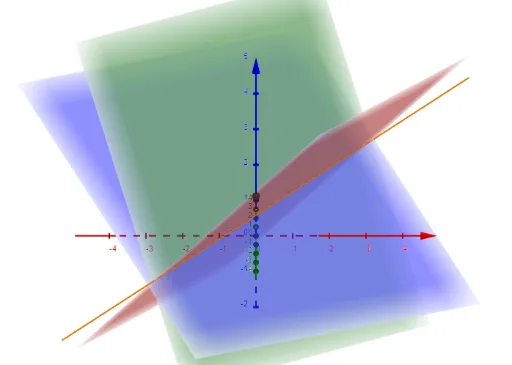
This example visualizes how a “sheaf of planes” can be organized in geometric space by displaying an interacting family of planes and the resulting consistent intersection structure. The key mathematical ideas include: planes (Plane), determinant-based linear dependence/feasibility checks (Determinant), and the computation of intersection paths or shared intersection geometry (IntersectPath). Construction-wise, it uses Plane to create multiple plane objects from given points and auxiliary elements, applies Determinant to encode the algebraic condition tying plane positions/parameters together, and then leverages IntersectPath to render the intersection path(s) or overlap behavior among the constructed objects. The included points/objects (e.g., A, B, C, D, E, and parameters such as a, b, c, M, d, f) work together in the same coordinate system to make the inter-plane relationship visually concrete. Suitable for high school honors through early university learners, especially for lessons connecting linear algebra with coordinate/solid geometry and for geometry-focused modeling exercises.
GeoGebra Commands & Parameters
Plane(A, B, C) → aPlane(A, B, D) → bPlane(A, B, E) → cDeterminant(M) → dIntersectPath(c, a) → f
AI Drawing Prompt Reference
Visualize a family of interacting planes in 3D space, defined by three points each, and show their intersection lines. Create three planes using sets of three points, compute the linear relationship among them using a matrix, and then find the intersection line between two of the planes, displaying the overall structure of the planes and their intersections.
The prompt above was compiled from the original drawing commands and is for reference only.