
Card Game and Fraction Comparison
Loading the math board and drawing, please wait…
In collections
Ordnen und Vergleichen von Bruchzahlen
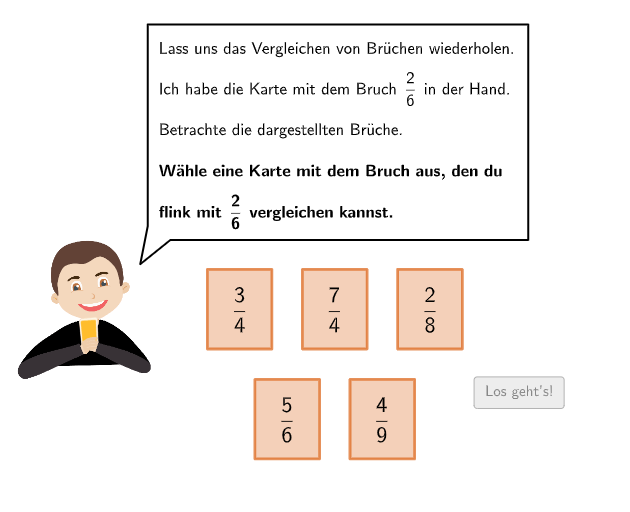
This example demonstrates comparing fractions through a card game. The core mathematical concepts involved are the comparison of fractions. Construction highlights the use of SelectedIndex, Element, If, Textfield, Flatten, Translate, Zip, Point, CountIf, etc., GeoGebra commands. Suitable for upper elementary or middle school students to learn fraction comparison.
GeoGebra Commands & Parameters
SelectedIndex(DropDown4c) → input4cSelectedIndex(DropDown3c) → input3cSelectedIndex(DropDown3b) → input3bSelectedIndex(DropDown1a) → input1aSelectedIndex(DropDown1b) → input1bSelectedIndex(DropDown4a) → input4aSelectedIndex(DropDown4b) → input4bSelectedIndex(DropDown2a) → input2aSelectedIndex(DropDown3a) → input3aElement(listselected, runde) → selectedSelectedIndex(DropDown2b) → input2bSelectedIndex(DropDownB) → inputBIf(selected ≟ 2, 4, 5.2) → fracsizexIf(selected ≟ 2, (1.33948, 1), (1.8, 1)) → C1Element({correct1, correct2a ∧ correct2b, correct3a ∧ correct3b ∧ correct3c, correct4a ∧ correct4b ∧ correct4c, true}, selected) → correctATextfield(inputB) → Eingabefeld2If(runde ≟ 1, A1, A2) → AFlatten(Sequence[Sequence[A + (m * (vsizex / 2 + 0.4, 0)) + (j * (0, vsizey - 0.8)), m, 0, 5], j, 0, 1]) → listAllPointsTranslate(Polygon[(0, 0), (vsizex, 0), (vsizex, vsizey), (0, vsizey)], listAllPoints(1)) → v1Translate(Polygon[(0, 0), (vsizex, 0), (vsizex, vsizey), (0, vsizey)], listAllPoints(3)) → v2Translate(Polygon[(0, 0), (vsizex, 0), (vsizex, vsizey), (0, vsizey)], listAllPoints(5)) → v3Translate(Polygon[(0, 0), (vsizex, 0), (vsizex, vsizey), (0, vsizey)], listAllPoints(8)) → v4Translate(Polygon[(0, 0), (vsizex, 0), (vsizex, vsizey), (0, vsizey)], listAllPoints(10)) → v5Zip(Translate[Polygon[(0, 0), (vsizex, 0), (vsizex, vsizey), (0, vsizey)], P], P, listP) → listWhiteVPoint(Line[B1, xAxis]) → B2Translate(Polygon[(0, 0), (vsizex, 0), (vsizex, vsizey), (0, vsizey)], B1) → w1Translate(Polygon[(0, 0), (vsizex, 0), (vsizex, vsizey), (0, vsizey)], B2) → w2Flatten(Sequence[Sequence[C1 + (m * (fracsizex / 6, 0)) + (j * (0, fracsizey)), m, 0, 5], j, 0, 0]) → listPointsLZip(Translate[Polygon[(0, 0), (fracsizex / 6, 0), (fracsizex / 6, fracsizey), (0, fracsizey)], P], P, listPointsL) → listVLFlatten(Sequence[Sequence[C2 + (m * (fracsizex / numN, 0)) + (j * (0, fracsizey)), m, 0, numN - 1], j, 0, 0]) → listPointsRZip(Translate[Polygon[(0, 0), (fracsizex / 6, 0), (fracsizex / 6, fracsizey), (0, fracsizey)], P], P, {listPointsL(1), listPointsL(2)}) → listVLZFlatten(Sequence[Sequence[C2 + (m * (fracsizex / numN, 0)) + (j * (0, fracsizey)), m, 0, numZ - 1], j, 0, 0]) → listPointsRZTextfield(inputB) → Eingabefeld1Translate(Segment[(fracsizex / 2, 0), (fracsizex / 2, fracsizey)], C1) → f1Translate(Segment[(fracsizex / 2, 0), (fracsizex / 2, fracsizey)], C2) → f2Translate(Polygon[((-padding), padding), (vsizex + padding, padding), (vsizex + padding, vsizey - padding), ((-padding), vsizey - padding)], listP(selected)) → vselectedFlatten(Sequence[Sequence[C2 + (m * (fracsizex / numN, 0)) + (j * (0, fracsizey)), m, 0, (2 * numN) - 1], j, 0, 0]) → listPointsR2Translate(Segment[(fracsizex, 0), (fracsizex, fracsizey)], C1) → f3Translate(Segment[(fracsizex, 0), (fracsizex, fracsizey)], C2) → f4CountIf(m ≟ 0, m, listselected) → selectedtogoSpeechBubbleLeft(B, 9.4, 5.3) → Vieleck1SpeechBubbleLeft(E, 12, 2.9) → Vieleck2SpeechBubbleLeft(H, 8.5, 1.6) → Vieleck3Zip(Translate[Polygon[(0, 0), (fracsizex / numN, 0), (fracsizex / numN, fracsizey), (0, fracsizey)], P], P, listPointsR) → listVRSpeechBubbleLeft(M, 9, 1.23) → Vieleck4Zip(Translate[Polygon[(0, 0), (fracsizex / numN, 0), (fracsizex / numN, fracsizey), (0, fracsizey)], P], P, listPointsR2) → listVR2Zip(Translate[Polygon[(0, 0), (fracsizex / numN, 0), (fracsizex / numN, fracsizey), (0, fracsizey)], P], P, listPointsRZ) → listVRZ
AI Drawing Prompt Reference
Create a card-style layout for comparing fractions. Draw an outer rectangular play area, then subdivide it into equal-height grid cells and form multiple columns of small rectangle blocks. Arrange two groups of fraction tiles side by side by translating repeated block polygons horizontally, so each group represents a different fraction partition. Use vertical and horizontal subdivision lines so the tiles correspond to equal fraction units, and provide two emphasis regions where the compared fractions (and option-like areas) appear within the grid. Add simple text fields or speech-bubble labels near the relevant areas to display the chosen fraction information and a brief prompt about correctness.
The prompt above was compiled from the original drawing commands and is for reference only.