
Constructing a Prism of Planes and Its Key Angles
Loading the math board and drawing, please wait…
In collections
TFM1 Study Day 2: Vectors
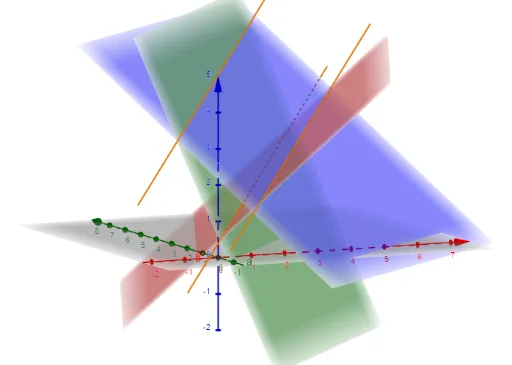
This example demonstrates how to construct a “prism of planes” configuration in GeoGebra and visualize the most important angular relationships and cross-sectional shapes. The core topics are solid geometry (a prism formed by plane pieces), angles within planes and between planes, and the use of geometry tools to establish exact relationships from computed quantities. Construction highlights: it uses the GeoGebra commands “Determinant” and “IntersectPath” to compute determinants and to find intersection points between constructed paths/curve segments, producing the required geometric objects (M, d, c, b, a, f, g, h) that build the prism and its angle structure. Suitable for upper secondary to early college, and for interactive teaching of 3D/plane-angle concepts via geometric modeling in GeoGebra.
GeoGebra Commands & Parameters
Determinant(M) → dIntersectPath(a, b) → fIntersectPath(a, c) → gIntersectPath(b, c) → h
AI Drawing Prompt Reference
Draw a prism formed by multiple intersecting planes, emphasizing key angular relationships. Construct three planes that intersect pairwise, creating three intersection lines that form the prism's edges. Mark important angles, including dihedral angles between faces and angles within each face. Use determinant calculations to establish plane orientations and locate intersection points of the edge paths to define vertices and cross-sectional polygons. The final figure should clearly show the prism's 3D structure, the angles between planes, and the polygonal sections formed by the intersecting lines, suitable for teaching solid geometry and angle concepts.
The prompt above was compiled from the original drawing commands and is for reference only.