
Geometric Visualization of Complex Multiplication
Loading the math board and drawing, please wait…
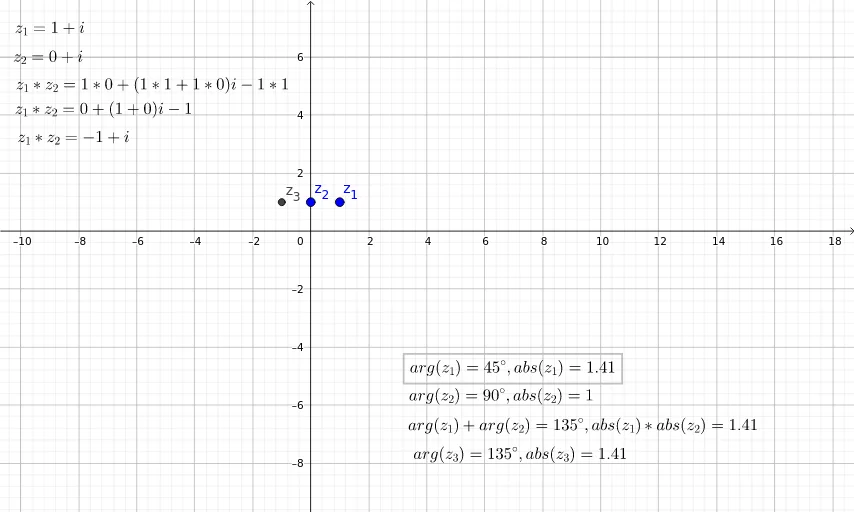
This example visualizes how complex multiplication acts geometrically: when multiplying by a complex number, a point/vector representing another complex number undergoes rotation and scaling (a similarity transformation). It demonstrates key ideas of complex number multiplication, the relationship between modulus and argument (polar-coordinate intuition), and how algebraic products translate into geometric transformations. From the construction summary, the model is built using complex objects z_1, z_2, z_{3} together with intermediate quantities a_1, a_2, a_3, r_1, r_2, i_1, i_2 and additional parameters a, b, c, d, e to connect components and magnitudes. Angle α and scaling factors s_1, s_2, s_3 control the rotation/stretch, while text objects (text1–text9, including text6–text9) label the crucial geometric and algebraic elements. The visualization is well-suited for high school through early university students learning complex numbers, and for classroom demonstrations and guided exploration.
GeoGebra Commands & Parameters
1 + ί0 + ί(z_1 * z_2)arg(z_1)arg(z_2)arg(z_{3})a_{1} + a_{2}abs(z_1)abs(z_2)abs(z_{3})(s_{1} * s_{2})real(z_1)real(z_2)imaginary(z_1)imaginary(z_2)(r_{1} * r_{2})(r_{1} * i_{2})(i_{1} * r_{2})(i_{1} * i_{2})
AI Drawing Prompt Reference
Create a single coordinate-plane visualization of complex multiplication as a geometric similarity transformation. Start from the two complex points z1 = 1 + i and z2 = 0 + i, then construct their product z1·z2 and include the angle quantities arg(z1), arg(z2), and arg(z3) to represent the rotation (argument) for the corresponding complex numbers. Also show the magnitudes |z1|, |z2|, and |z3|, together with real(z1), real(z2), imaginary(z1), and imaginary(z2) to connect algebraic components to geometry. Use an intermediate combination a1 + a2, and relate scaling by indicating the product of magnitude factors such as s1·s2. Include intermediate products r1·r2, r1·i2, i1·r2, and i1·i2 to connect the component-wise algebra to the rotation and stretch interpretation, presenting how the geometric transformation corresponds to the algebraic product.
The prompt above was compiled from the original drawing commands and is for reference only.