
Geometric Visualization of Multiplying by −1
Loading the math board and drawing, please wait…
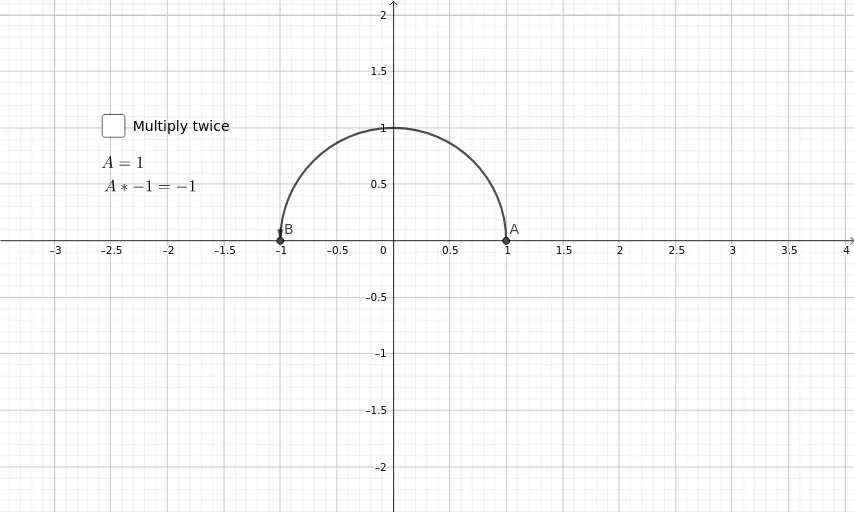
This example visually demonstrates what it means to multiply a real number (or a vector) by −1: the result reverses direction, corresponding to a central symmetry/flip relative to a baseline such as the origin. It highlights key ideas in sign changes for real-number arithmetic, the concept of an opposite number (vector negation), and the geometric interpretation of a symmetry transformation under continuous relations. Construction-wise, the model is built using GeoGebra commands indicated in the construction summary: Vector to create and display vectors (e.g., u and v, together with related points such as A, B, C, D and the vector m), and CircumcircleArc to support the geometric portrayal of directional/angle-related relationships. Labeled objects (text1, text2, text3) and component-related variables (like Bx) help connect the algebraic “× −1” with the observed geometric flip. Suitable for middle to high school students learning vectors, real numbers, and symmetry/transformations, as well as for classroom demonstrations linking algebraic operations to geometric meaning.
GeoGebra Commands & Parameters
CircumcircleArc(A, D, B) → dCircumcircleArc(B, C, A) → cVector(A - (sgn(m) * (0, 0.1)), A) → vVector(B + (sgn(m) * (0, 0.1)), B) → u
AI Drawing Prompt Reference
Draw a figure that geometrically illustrates multiplying a real number or vector by −1: place a pair of equal‑length vectors pointing in opposite directions from symmetric points about the origin, connect each point to the origin with a circular arc to show the directional flip, and add tiny perpendicular offset arrows at the vector tips to emphasize the reversal; the overall composition displays a central symmetry about the origin.
The prompt above was compiled from the original drawing commands and is for reference only.