
Exploring the iteration of x² from complex numbers
Loading the math board and drawing, please wait…
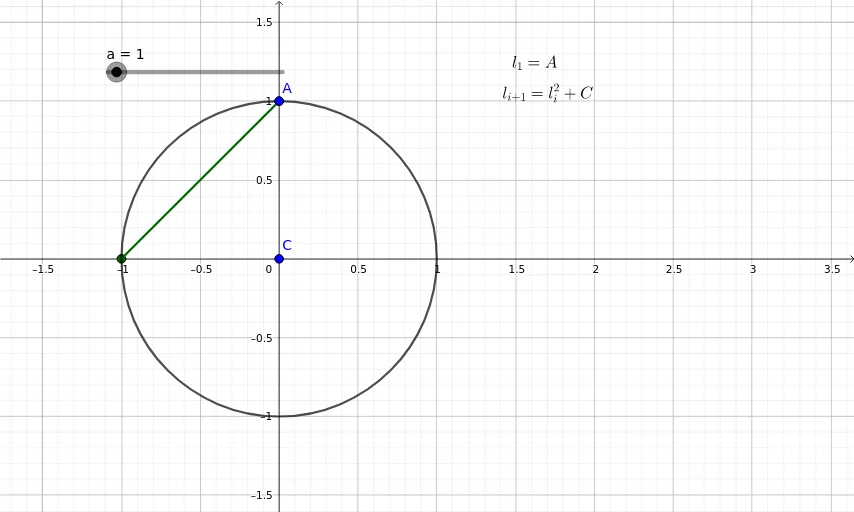
This example iteratively applies the function x² starting from various complex numbers to investigate whether the resulting sequence remains bounded or diverges. By setting an initial complex value a, the GeoGebra commands IterationList and Sequence generate the terms of the series, while Circle and Intersect are used to plot the trajectory in the complex plane. The core mathematical ideas involve complex arithmetic, convergence of iterative functions, and geometric representation in the complex plane. It is intended for high‑school or early university students studying complex numbers and dynamical systems, and can serve as a tool for exploratory learning and mathematical modeling.
GeoGebra Commands & Parameters
Intersect(xAxis, yAxis) → BCircle(B, 1) → cIterationList(z^(2) + C, z, {A}, a) → l1Sequence(Segment[l1(i), l1(i + 1)], i, 0, a) → l2
AI Drawing Prompt Reference
Draw a unit circle centered at the origin in the complex plane. Starting from an initial complex point, repeatedly apply the squaring function to generate a sequence of points. Connect these points in order with line segments to form a trajectory. The trajectory begins at the initial point and extends outward, possibly spiraling around the origin or diverging. The unit circle serves as a reference boundary to observe whether the iterated points remain inside or escape outside.
The prompt above was compiled from the original drawing commands and is for reference only.