
Geometric Visualization of Comparing Fractions Using Conditional Construction
Loading the math board and drawing, please wait…
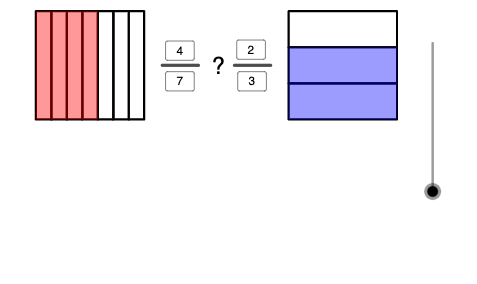
This GeoGebra example visually demonstrates how to compare fractions by mapping the “which is larger?” decision into geometric constructions. It helps learners see fraction comparison as a structured correspondence between parts of constructed shapes and the resulting inequality relationships. Key concepts include fraction ordering, equivalence/size comparison, inequality reasoning, and conditional logic applied to dynamically updated geometry. Construction-wise, it uses GeoGebra commands such as Point (to define key vertices), Polygon (to build comparison shapes like poly1 and poly2), Segment (to connect relevant points), Textfield (to display parameters and labels), Sequence (to generate evolving indices/values), and If (to branch the construction depending on comparison conditions). The model contains multiple dynamically generated objects (e.g., point sets labeled with variables like n and groups such as I/E/A/B/C/D, along with the constructed polygons and segment collections) to support different fraction cases. Suitable for middle-school math enrichment and classroom demonstrations on fractions and inequalities, as well as interactive exploratory learning.
GeoGebra Commands & Parameters
Point(xAxis) → IPolygon(A, B, 4) → poly1, f, g, h, i, C, DPolygon(E, F, 4) → poly2, j, k, l, m, G, HTextfield(d11) → d1Textfield(d22) → d2Textfield(n11) → n1Textfield(n22) → n2Sequence(H + (a / d11 * (G - H)), a, 0, d11) → l1Sequence(A + (a / d22 * (D - A)), a, 0, d22) → l2Sequence(E + (a / d11 * (F - E)), a, 0, d11) → l3Sequence(B + (a / d22 * (C - B)), a, 0, d22) → l4Sequence(Polygon[l1(a), l1(a + 1), l3(a + 1), l3(a)], a, 1, d11) → l5Sequence(Polygon[l2(a), l2(a + 1), l4(a + 1), l4(a)], a, 1, d22) → l6Sequence(Polygon[l1(a), l1(a + 1), l3(a + 1), l3(a)], a, 1, n11) → l7If(0 ≤ n ≤ 1, Dilate[E, 1 - n, I], I) → JSequence(Polygon[l2(a), l2(a + 1), l4(a + 1), l4(a)], a, 1, n22) → l8Point(xAxis) → KIf(0 ≤ n ≤ 1, Translate[l7, J - E], Translate[l7, I - E]) → l9If(0 ≤ n ≤ 1, Translate[l5, J - E], Translate[l5, I - E]) → l10If(0 ≤ n ≤ 1, Translate[l6, Dilate[A, 1 - n, I] - A], Translate[l6, I - A]) → l11If(2 ≤ n ≤ 3, Dilate[E, 3 - n, K], K) → LIf(2 ≤ n ≤ 3, Dilate[A, 3 - n, K], K) → MIf(2 ≤ n ≤ 3, Translate[l6, M - A], Translate[l6, K - A]) → l13If(2 ≤ n ≤ 3, Translate[l5, L - E], Translate[l5, K - E]) → l14If(2 ≤ n ≤ 3, Translate[l8, M - A], Translate[l8, K - A]) → l12Point(yAxis) → OSegment(N, O) → pSegment(P, Q) → q
AI Drawing Prompt Reference
Create a geometric diagram for comparing fractions. Place two squares on the coordinate axes, each representing a fraction. Divide each square into equal parts according to its denominator, and shade the number of parts indicated by the numerator. Use sliders or input fields to adjust numerators and denominators, dynamically updating the division lines and shaded areas. When the comparison result changes, the shapes translate or scale to visually show the inequality. Display numeric labels for both fractions and indicate the direction of the inequality sign. Keep the layout clear for classroom demonstration.
The prompt above was compiled from the original drawing commands and is for reference only.