
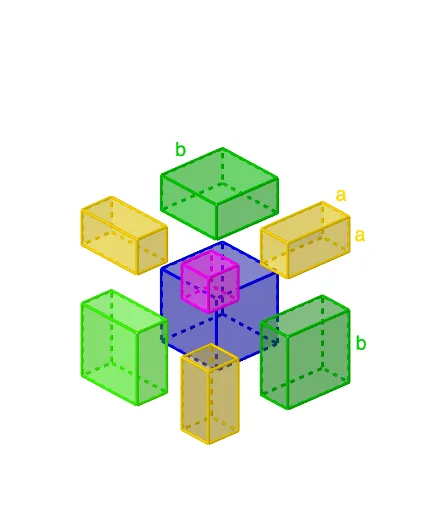
Geometric Representation of (a + b) Cubed
Loading the math board and drawing, please wait…
This example demonstrates the geometric representation of (a + b) cubed, illustrating volume calculations and solid geometry concepts. It involves constructing prisms, spheres, and polygons using GeoGebra commands like Point, Cube, Line, Intersect, and more. Ideal for high school students learning polynomial volume formulas and geometric relationships.
GeoGebra Commands & Parameters
Point(Circle[J, Distance[L, J], Segment[L, J]]) → KCube(L, J, K) → i, M, faceKMQP, faceNOPQ, edgeLM, edgeJL, edgeJK, edgeKM, edgeLN, edgeMQ, edgeNQ, edgeNO, N, edgeJO, edgeOP, edgeKP, edgePQ, O, P, Q, faceJKML, faceLMQN, faceJLNO, faceJKPOLine(A, xAxis) → hLine(A, zAxis) → fIntersect(f, faceNOPQ) → RLine(R, h) → jIntersect(edgeOP, j) → USphere(A, d) → eLine(A, yAxis) → gIntersect(f, e) → B, CIntersect(h, e) → D, EIntersect(g, e) → F, GLine(R, g) → kIntersect(edgeNO, k) → SDistance(R, U) → XRIntersect(edgeNQ, j) → TDistance(R, A) → ZRDistance(T, Q) → YRLine(V, j) → lLine(G, l) → mLine(E, g) → nLine(W, g) → pIntersect(m, n) → ZIntersect(l, n) → A_1Intersect(l, p) → B_1Intersect(m, p) → C_1Polygon(Z, C_1, B_1, A_1) → q1, z_1, c_1, b_1, a_1Line(D, n) → qIntersect(m, q) → F_1Intersect(l, q) → G_1Line(D_1, q) → rIntersect(r, l) → E_1Intersect(m, r) → H_1Polygon(E_1, H_1, F_1, G_1) → q2, e_1, h_1, f_1, g_1Line(F, h) → sLine(I_1, s) → tIntersect(r, s) → J_1Intersect(q, s) → K_1Intersect(q, t) → L_1Intersect(r, t) → M_1Intersect(k, s) → N_1Intersect(t, p) → O_1Intersect(s, p) → P_1Intersect(s, n) → Q_1Intersect(t, n) → R_1Polygon(M_1, J_1, K_1, L_1) → q3, m_1, j_1, k_1, l_1Polygon(R_1, Q_1, P_1, O_1) → q4, r_1, q_1, p_1, o_1OrthogonalLine(A_1, q1) → i_1OrthogonalLine(B_1, q1) → n_1OrthogonalLine(C_1, q1) → s_1OrthogonalLine(Z, q1) → t_1OrthogonalLine(E_1, q2) → d_1OrthogonalLine(G_1, q2) → f_2OrthogonalLine(H_1, q2) → g_2OrthogonalLine(F_1, q2) → h_2OrthogonalPlane(C, f) → p_2Intersect(d_1, p_2) → S_1Intersect(g_2, p_2) → T_1Intersect(h_2, p_2) → U_1Intersect(f_2, p_2) → V_1Intersect(t_1, p_2) → W_1Intersect(i_1, p_2) → Z_1Intersect(s_1, p_2) → A_2Intersect(n_1, p_2) → B_2Polygon(W_1, A_2, B_2, Z_1) → q5, w_1, a_2, b_2, i_2Polygon(T_1, U_1, V_1, S_1) → q6, j_2, u_1, v_1, k_2OrthogonalLine(O_1, q4) → l_2OrthogonalLine(P_1, q4) → m_2OrthogonalLine(Q_1, q4) → n_2OrthogonalLine(R_1, q4) → q_2OrthogonalLine(J_1, q3) → r_2OrthogonalLine(M_1, q3) → s_2OrthogonalLine(L_1, q3) → t_2OrthogonalLine(K_1, q3) → c_2Intersect(l_2, p_2) → C_2Intersect(m_2, p_2) → D_2Intersect(n_2, p_2) → E_2Intersect(q_2, p_2) → F_2Intersect(s_2, p_2) → G_2Intersect(t_2, p_2) → H_2Intersect(r_2, p_2) → I_2Intersect(c_2, p_2) → J_2Polygon(G_2, H_2, J_2, I_2) → q7, d_2, e_2, f_3, g_3Polygon(F_2, C_2, D_2, E_2) → q8, h_3, i_3, j_3, k_3OrthogonalPlane(B, f) → p_3Intersect(n_1, p_3) → K_2Intersect(i_1, p_3) → L_2Intersect(t_1, p_3) → M_2Intersect(s_1, p_3) → N_2Intersect(f_2, p_3) → O_2Intersect(d_1, p_3) → P_2Intersect(g_2, p_3) → Q_2Intersect(h_2, p_3) → R_2Polygon(K_2, L_2, M_2, N_2) → q9, l_3, m_3, n_3, q_3Polygon(O_2, P_2, Q_2, R_2) → q10, o_2, r_3, s_3, t_3Intersect(r_2, p_3) → S_2Intersect(c_2, p_3) → T_2Intersect(t_2, p_3) → U_2Intersect(s_2, p_3) → V_2Intersect(n_2, p_3) → W_2Intersect(q_2, p_3) → Z_2Intersect(m_2, p_3) → A_3Intersect(l_2, p_3) → B_3Polygon(Z_2, W_2, A_3, B_3) → q11, z_2, w_2, a_3, b_3Polygon(U_2, T_2, S_2, V_2) → q12, u_2, c_3, d_3, v_2Prism(q6, ZR) → v, G_3, edge10, edge11, edge12, edge9, edge13, edge15, edge16, edge14, H_3, I_3, J_3, face8, face9, face7, face6, face10Prism(q7, ZR) → w, K_3, edge17, edge18, edge20, edge19, edge21, edge23, edge24, edge22, L_3, M_3, N_3, face11, face13, face14, face12, face15Prism(q8, ZR) → e_3, O_3, edge28, edge25, edge26, edge27, edge29, edge31, edge32, edge30, P_3, Q_3, R_3, face17, face16, face18, face19, face20Prism(q5, ZR) → o_3, S_3, edge33, edge35, edge36, edge34, edge37, edge39, edge40, edge38, T_3, U_3, V_3, face22, face24, face23, face21, face25Prism(q9, u_3) → v_3, W_3, edge41, edge42, edge43, edge44, edge45, edge47, edge48, edge46, Z_3, A_4, B_4, face26, face28, face29, face27, face30Prism(q11, ZL) → w_3, C_4, edge50, edge49, edge51, edge52, edge53, edge55, edge56, edge54, D_4, E_4, F_4, face31, face32, face34, face33, face35Prism(q10, a_4) → b_4, G_4, edge57, edge58, edge59, edge60, edge61, edge63, edge64, edge62, H_4, I_4, J_4, face36, face38, face39, face37, face40Prism(q12, c_4) → d_4, K_4, edge67, edge66, edge65, edge68, edge69, edge71, edge72, edge70, L_4, M_4, N_4, face43, face41, face42, face44, face45Midpoint(edge58) → D_3Midpoint(edge9) → C_9Midpoint(edge14) → C_10Midpoint(edge22) → E10Midpoint(edge21) → E_3Midpoint(T_3, U_3) → C_3
AI Drawing Prompt Reference
Draw a cube and a sphere inside it, with the sphere intersecting one face of the cube at two points. Add the diagonals of the cube. Then, on one face of the cube, draw two line segments that intersect the diagonal at a point, and connect this point to a vertex of the cube to form two triangles. Finally, draw three triangles outside the cube, intersecting its three faces and connecting the intersection points.
The prompt above was compiled from the original drawing commands and is for reference only.