
Geometric & Probability Animation Demo
Loading the math board and drawing, please wait…
In collections
Congruence (CO) Cluster
Congruence (Vol 2)
CCSS High School: Geometry (Congruence) Volume 2
CCSS High School: Geometry (Congruence) Volume 2
CCSS High School: Geometry (Congruence) Volume 2
Geometry (Congruence) Volume 2
CCSS High School: Geometry (Congruence) Volume 2
CCSS High School: Geometry (Congruence) Volume 2
CCSS High School: Geometry (Congruence) Volume 2
CCSS High School: Geometry (Congruence) Volume 2
CCSS High School: Geometry (Congruence) Volume 2
CCSS High School: Geometry (Congruence) Volume 2
CCSS High School: Geometry (Congruence) Volume 2
Gail LeBlancCCSS High School: Geometry (Congruence) Volume 2
CCSS High School: Geometry (Congruence) Volume 2
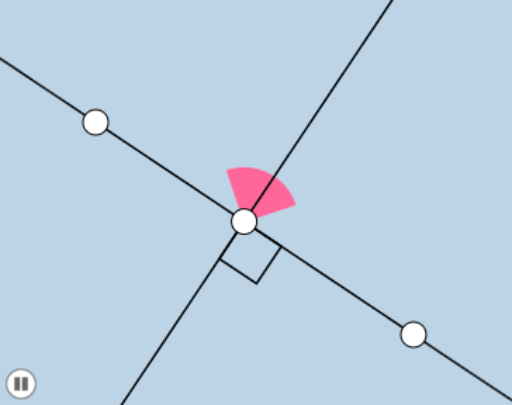
This example demonstrates interactive geometry and transformations involving points, lines, and circles, combined with probability concepts like binomial distribution through animation. Core math concepts include angles, complex numbers, Pythagorean theorem, straight lines, random experiments, and binomial distribution. GeoGebra commands used are Line, Circle, Intersect, Ray, Segment, Point, OrthogonalLine, Min, CircleSector, Angle, Rotate. Suitable for high school and above students to visualize geometric transformations and their statistical connections.
GeoGebra Commands & Parameters
Line(A, B) → fCircle(A, 1) → cCircle(B, 1) → dIntersect(d, f, 2) → CIntersect(c, f, 1) → DRay(B, C) → gRay(A, D) → hSegment(A, B) → iPoint(i) → ESegment(E, B) → jSegment(E, A) → kOrthogonalLine(E, j) → lMin(k, j) → aCircle(E, (0.3 * a)) → eIntersect(e, j, 1) → FIntersect(e, l, 2) → GCircleSector(E, F, G) → pIntersect(e, k, 1) → HIntersect(e, l, 1) → IPoint(l) → JAngle(J, E, B) → αRotate(p, If[1 < b ≤ 2, ((b - 1) * π / 2), π / 2], E) → p'