
Geometric Construction: Drawing Irregular Squares
Loading the math board and drawing, please wait…
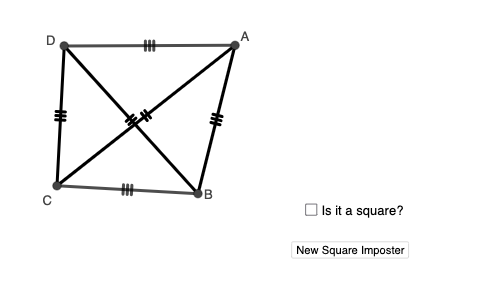
This example demonstrates how to draw irregular squares using GeoGebra. It involves constructing squares, random points, line segments, and angles. Key mathematical concepts include geometric construction, coordinate geometry, and transformations. The construction uses commands like Circle, RandomPointIn, Segment, and Angle, with objects such as A1, c, C1. Suitable for middle school students or high school students learning geometry, and useful for math teaching demonstrations.
GeoGebra Commands & Parameters
Circle(A_{1}, 2) → cCircle(C_{1}, Radius[c]) → dCircle(D_{1}, Radius[d]) → eCircle(E_{1}, Radius[e]) → fRandomPointIn(c) → ARandomPointIn(d) → BRandomPointIn(e) → CRandomPointIn(f) → DSegment(D, A) → gSegment(A, B) → hSegment(B, C) → iSegment(C, D) → jAngle(C, D, A) → αAngle(A, B, C) → βAngle(B, C, D) → γAngle(D, A, B) → δSegment(D, A) → kSegment(A, B) → lSegment(B, C) → mSegment(C, D) → pSegment(D, B) → qSegment(A, C) → rIntersect(q, r) → ESegment(D, E) → sSegment(E, B) → tSegment(E, A) → aSegment(E, C) → bAngle(B, E, A) → εAngle(A, E, D) → ζSegment(A, C) → f_1Segment(D, B) → g_1Angle(E, A, B) → ηAngle(D, A, E) → θAngle(E, D, A) → ιAngle(C, D, E) → κAngle(E, C, D) → λAngle(B, C, E) → μAngle(E, B, C) → νAngle(A, B, E) → ξSegment(D, A) → h_1Segment(C, B) → i_1Segment(A, B) → j_1Segment(D, C) → k_1Angle(A, B, C) → οAngle(B, C, D) → ρSegment(A, C) → l_1Segment(D, B) → m_1Segment(D, A) → n_1Segment(C, B) → p_1Segment(D, C) → q_1Segment(A, B) → r_1Segment(A, E) → s_1Segment(E, C) → t_1Segment(B, E) → a_1Segment(E, D) → b_1Angle(C, E, B) → σAngle(D, E, C) → τIf(n ∈ {1, 2, 3, 4, 5, 6, 7}, "Yes!", "No") → text1Angle(A, E, D) → υAngle(C, E, D) → ϕSegment(A, E) → c_1Segment(E, C) → d_1Segment(E, B) → e_1Segment(E, D) → f_2Angle(C, E, B) → χAngle(D, E, C) → ψSegment(D, A) → g_2Segment(C, B) → h_2Segment(A, B) → i_2Segment(D, C) → j_2Angle(B, C, D) → ωAngle(C, D, A) → α_1Segment(A, C) → k_2Segment(D, B) → l_2Segment(D, A) → m_2Segment(C, B) → n_2Segment(A, B) → p_2Segment(D, C) → q_2Angle(B, C, D) → β_1Angle(C, D, A) → γ_1Angle(D, A, B) → δ_1
AI Drawing Prompt Reference
Draw an irregular quadrilateral by creating three circles, selecting random points within each circle to form vertices, and connecting these points with line segments. Calculate and draw the interior angles of the quadrilateral, then connect the intersection point of the diagonals to the vertices, creating smaller triangles and internal angles to illustrate geometric construction and coordinate geometry concepts.
The prompt above was compiled from the original drawing commands and is for reference only.