
Geometric Addition and Subtraction of Two Vectors
Loading the math board and drawing, please wait…
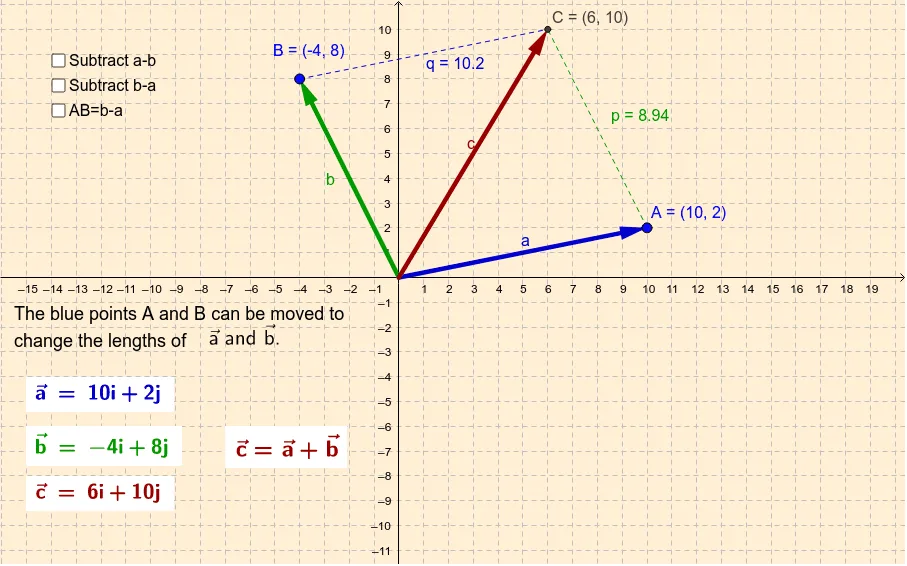
This example demonstrates the geometric interpretation of adding and subtracting two vectors by constructing vectors head-to-tail (and comparing with subtraction) to reveal how the resulting vector depends on magnitude and direction. It centers on vector addition and subtraction, viewing vectors as directed displacements, and using endpoint relationships to build the corresponding resultant vector. Construction is carried out in GeoGebra using the commands Vector to define vector objects (e.g., aVector, bVector, cVector and related vectors), Point to place vector endpoints and auxiliary points (e.g., A, B, C), Line and Intersect to support any intersection-based auxiliary geometry, and Segment to draw the connecting segments that represent sums/results. The activity is well suited for middle school through early university, particularly for interactive lessons on vectors, direction, and geometric reasoning.
GeoGebra Commands & Parameters
Vector(A) → aVector(B) → bLine(B, a) → mLine(A, b) → nIntersect(m, n) → CSegment(A, C) → pSegment(B, C) → qVector(D) → uVector(A + D) → vPoint(v) → ESegment(A, E) → eSegment(E, D) → fPoint(j) → FPoint(i) → GSegment(F, B) → kSegment(F, G) → lVector(A, B) → w
AI Drawing Prompt Reference
Draw two vectors, connect the starting point of the first vector to the ending point of the second, and find the intersection point. Then connect the intersection point to the starting points of both vectors to show vector addition. Next, draw a reverse vector, connect the ending point of the first vector to the starting point of this reverse vector, find the intersection point, and connect it to the starting and ending points of both vectors to show vector subtraction, comparing the results of addition and subtraction geometrically.
The prompt above was compiled from the original drawing commands and is for reference only.