
Geometric Demo of Vector Scalar Multiplication: Stretching and Reversing
Loading the math board and drawing, please wait…
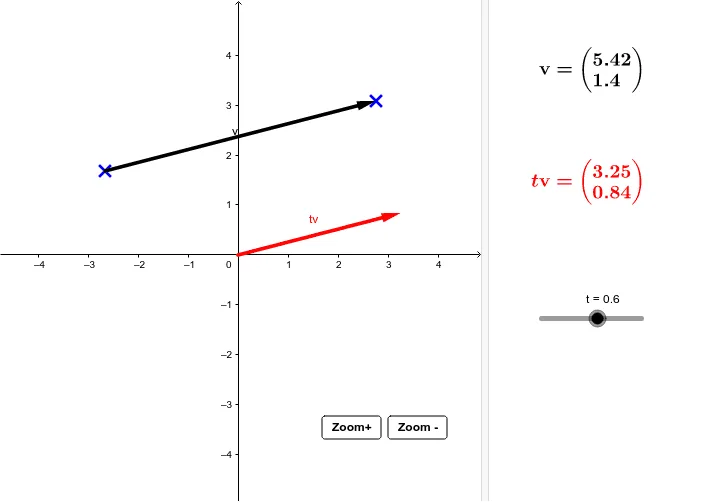
This GeoGebra example demonstrates how vector scalar multiplication affects both magnitude and direction in the plane. By changing the scalar, the resulting vector is stretched or shrunk along the original direction; using a negative scalar flips the direction. The key mathematical ideas are vectors, scalar multiples, the geometric meaning of a vector’s length (magnitude), and direction, interpreted through position/vector construction. Construction focuses on using the Vector command to create the involved vectors (such as forming the base vector v from points A and B, building additional vectors like t and the scaled result v_1), along with text objects (text1, text2) to label proportions and outcomes. Buttons (button1, button2) support switching between cases so learners can visually track how v transforms under different scalar values. Suitable for middle school through early university levels, especially for introducing vector operations and building intuition for linear relationships.
GeoGebra Commands & Parameters
Vector(A, B) → v
AI Drawing Prompt Reference
Create two points on a coordinate plane and form a base vector pointing from the first point to the second. Then construct the scalar multiple of this vector as a new vector that visually shows how changing the scalar scales its magnitude along the original direction; when the scalar is negative, the new vector should reverse direction. Add text labels indicating the proportion (scalar multiple) and the resulting vector. Arrange the figure so the viewer can switch between cases with different scalar values to observe how the base vector transforms.
The prompt above was compiled from the original drawing commands and is for reference only.