
GeoGebra Powers of 1-5
Loading the math board and drawing, please wait…
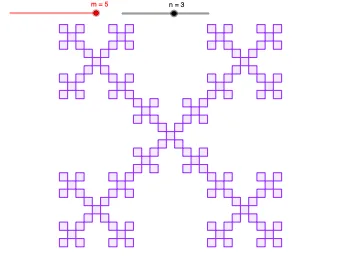
This example demonstrates the power of numbers from 1 to 5, involving exponentiation, geometric transformations, and probability concepts. Construction uses commands like Midpoint, Sequence, and Polygon with parameters a, b, c, d to adjust the graph. Suitable for middle school students learning exponential functions or for geometric construction practice.
GeoGebra Commands & Parameters
Midpoint(A, B) → FMidpoint(B, C) → GMidpoint(D, A) → JMidpoint(C, D) → ISequence(Polygon[Dilate[A, 1 / 3, Element[P, k]], Dilate[B, 1 / 3, Element[P, k]], Dilate[C, 1 / 3, Element[P, k]], Dilate[D, 1 / 3, Element[P, k]]], k, 1, m) → S1Polygon(A, B, C, D) → S0, a, b, c, dSequence(Dilate[S1, 1 / 3, Element[P, k]], k, 1, m) → S2Sequence(Dilate[S2, 1 / 3, Element[P, k]], k, 1, m) → S3Sequence(Dilate[S3, 1 / 3, Element[P, k]], k, 1, m) → S4Sequence(Dilate[S4, 1 / 3, Element[P, k]], k, 1, m) → S5
AI Drawing Prompt Reference
Draw a square ABCD, then shrink it by 1/3 successively four times to form a series of smaller squares. First, find the midpoints F, G, J, I of AB, BC, CD, DA, then construct a new square with these midpoints as vertices. Next, shrink the square successively four more times.
The prompt above was compiled from the original drawing commands and is for reference only.