
Gal 3: Circle Chain Geometry Demo
Loading the math board and drawing, please wait…
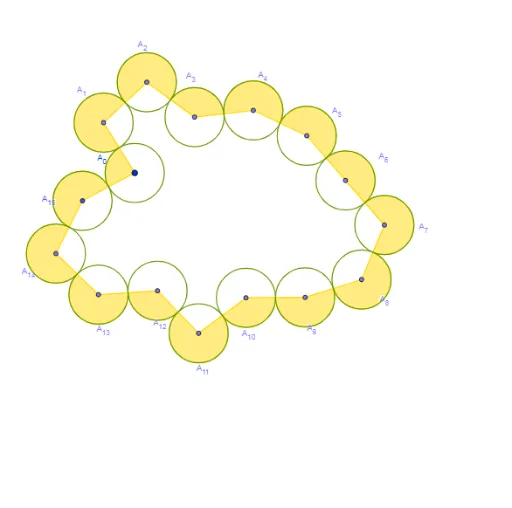
This example demonstrates the construction of complex geometric figures through dynamic circle chains. Core math concepts include circles, geometric construction, inequalities, vectors, and three-dimensional space. Construction highlights from the GeoGebra command summary involve commands like Point, Segment, Circle, Intersect, and CircleSector, along with objects such as A_0 to A_15. Suitable for high school and above, it aids in understanding spatial geometry and parametric construction principles and techniques.
GeoGebra Commands & Parameters
Point(yAxis) → A_0Point(Circle[A_0, (2 * r)]) → A_1Segment(A_0, A_1) → fPoint(Circle[A_1, (2 * r)]) → A_2Segment(A_1, A_2) → gPoint(Circle[A_2, (2 * r)]) → A_3Segment(A_2, A_3) → hPoint(Circle[A_3, (2 * r)]) → A_4Segment(A_3, A_4) → iPoint(Circle[A_4, (2 * r)]) → A_5Segment(A_4, A_5) → jPoint(Circle[A_5, (2 * r)]) → A_6Segment(A_5, A_6) → kPoint(Circle[A_6, (2 * r)]) → A_7Segment(A_6, A_7) → lPoint(Circle[A_7, (2 * r)]) → A_8Segment(A_7, A_8) → mPoint(Circle[A_8, (2 * r)]) → A_9Segment(A_8, A_9) → nPoint(Circle[A_9, (2 * r)]) → A_{10}Segment(A_9, A_{10}) → pPoint(Circle[A_{10}, (2 * r)]) → A_{11}Segment(A_{10}, A_{11}) → qPoint(Circle[A_{11}, (2 * r)]) → A_{12}Segment(A_{11}, A_{12}) → sPoint(Circle[A_{12}, (2 * r)]) → A_{13}Segment(A_{12}, A_{13}) → tPoint(Circle[A_{13}, (2 * r)]) → A_{14}Segment(A_{13}, A_{14}) → aCircle(A_0, (2 * r)) → dCircle(A_{14}, (2 * r)) → eIntersect(d, e) → B, A_{15}, ,Segment(A_{15}, A_{14}) → bSegment(A_{15}, A_0) → cCircle(A_0, r) → c_1Circle(A_1, r) → d_1Circle(A_2, r) → e_1Circle(A_3, r) → f_1Circle(A_4, r) → g_1Circle(A_5, r) → h_1Circle(A_6, r) → k_1Circle(A_7, r) → p_1Circle(A_8, r) → q_1Circle(A_9, r) → r_1Circle(A_{11}, r) → s_1Circle(A_{10}, r) → t_1Circle(A_{12}, r) → c_2Circle(A_{13}, r) → d_2Circle(A_{14}, r) → e_2Circle(A_{15}, r) → f_2Intersect(e_1, g) → A,Intersect(d_1, f) → C,Intersect(c_1, c) → D,Intersect(f_2, b) → E,Intersect(e_2, a) → F,Intersect(d_2, t) → G,Intersect(c_2, s) → H,Intersect(s_1, q) → I,Intersect(t_1, p) → J,Intersect(r_1, n) → K,Intersect(q_1, m) → L,Intersect(p_1, l) → M,Intersect(k_1, k) → N,Intersect(h_1, j) → O,Intersect(f_1, i) → P,Intersect(f_1, h) → Q,CircleSector(A_0, C, D) → g_2CircleSector(A_1, A, C) → h_2CircleSector(A_2, Q, A) → k_2CircleSector(A_3, P, Q) → p_2CircleSector(A_4, O, P) → q_2CircleSector(A_5, N, O) → r_2CircleSector(A_6, M, N) → s_2CircleSector(A_7, L, M) → t_2CircleSector(A_8, K, L) → c_3CircleSector(A_9, J, K) → d_3CircleSector(A_{10}, I, J) → e_3CircleSector(A_{11}, H, I) → f_3CircleSector(A_{12}, G, H) → g_3CircleSector(A_{13}, F, G) → h_3CircleSector(A_{14}, E, F) → k_3CircleSector(A_{15}, D, E) → p_3
AI Drawing Prompt Reference
Start with a point on the y-axis. From this point, repeatedly draw a circle with twice the radius, pick a point on that circle as the next center, and continue this process to create a chain of fifteen points. Connect consecutive points with segments to form a polyline. Draw circles of twice the radius centered at the first and last points; their intersection gives two points, one of which is connected back to the first and last points, forming a closed triangle. Then, centered at each chain point, draw small circles of single radius, creating a chain of tangent small circles. The final figure shows a geometric chain with a closing triangle and a series of small circles.
The prompt above was compiled from the original drawing commands and is for reference only.