
Exact Values on the Unit Circle (Degrees)
Loading the math board and drawing, please wait…
In collections
Unit Circle and Radian Defining
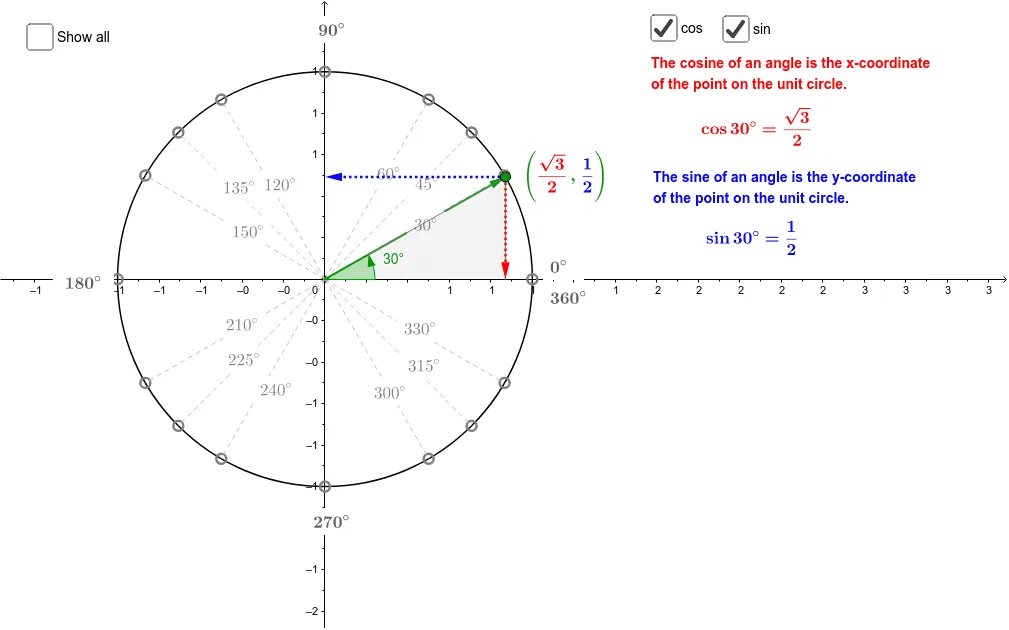
This example demonstrates the relationship between angles and trigonometric values (sine, cosine) on the unit circle. Core math concepts include trigonometric functions, unit circle, angle measurement, and geometric construction. It is constructed using GeoGebra commands such as Intersect, Point, Circle, Segment, Distance, Angle, Vector, and Polygon. Suitable for high school students to understand basic properties of trigonometric functions and their geometric interpretations, as well as for visualizing related topics in teaching.
GeoGebra Commands & Parameters
Intersect(xAxis, yAxis) → OPoint(xAxis) → ECircle(O, E) → c_1Point(c_1) → XSegment(O, X) → aDistance(X, A_1) → bAngle(E, O, X) → αSegment(A_1, (x(A_1), 0)) → fSegment(A_2, (x(A_2), 0)) → gSegment(B_2, B_1) → hSegment(C_2, C_1) → iVector(O, X) → uVector(X, (x(X), 0)) → vVector(X, (0, y(X))) → wPoint(u) → ASegment(A, C_2) → eSegment(A, B_2) → jSegment(A, A_2) → kSegment(A, A_3) → lSegment(A, B_3) → mSegment(A, C_3) → nSegment(A, C_4) → pSegment(A, B_4) → qSegment(A, A_4) → rSegment(A, A_1) → s_1Segment(A, B_1) → tSegment(A, C_1) → a_1Polygon(X, (x(X), 0), A) → poly1, a_2, B, b_1Polygon((abs(x(X)), abs(y(X))), A, (abs(x(X)), 0)) → poly2, d_1, e_1, a_3
AI Drawing Prompt Reference
Draw a unit circle in a coordinate system, marking the intersection of the x-axis and y-axis as the origin. Take a point on the circle, connect it to the origin to form a line segment. Then, draw perpendiculars from this point to the x-axis and y-axis, measuring the angle and distance. From this point, draw multiple vectors towards each quadrant and connect these vectors to the boundary points of each quadrant. Finally, connect these points and the origin to form several polygons, illustrating the geometric meaning of trigonometric values.
The prompt above was compiled from the original drawing commands and is for reference only.