
Function Butterfly
Loading the math board and drawing, please wait…
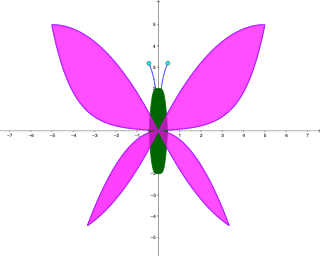
This example dynamically demonstrates the symmetry and intersection points of function graphs, visually showcasing the Function Butterfly phenomenon. It involves core math concepts like functions, symmetry, tangent functions, linear equations, quadratic functions, intersections, and histograms. Construction highlights include GeoGebra commands like IntegralBetween (integral) and Point, as detailed in the summary. Suitable for high school and above learners to understand function properties and geometric intuition.
GeoGebra Commands & Parameters
IntegralBetween(fl1, fl2, -5, 0) → aIntegralBetween(fr1, r2, 0, 5) → cIntegralBetween(utw, bl, -3.32, 0) → dIntegralBetween(utw, br, 0, 3.32) → eIntegralBetween(b1, b2, -0.43, 0.43) → bPoint(an) → BPoint(an2) → A
AI Drawing Prompt Reference
Draw a function butterfly, consisting of two symmetric curves, one below the x-axis and one above. Use sine and cosine functions to draw these curves on both sides of the x-axis, making them intersect near the origin. Add two tangent lines and two parabolas that are tangent to the curves. Finally, calculate and mark the area between the curves, generating a histogram of the area.
The prompt above was compiled from the original drawing commands and is for reference only.