
Interactive Homographic Function: Constructing a Hyperbola with Asymptotes
Loading the math board and drawing, please wait…
In collections
The GeoGebra's Toolbox for Teachers and Students
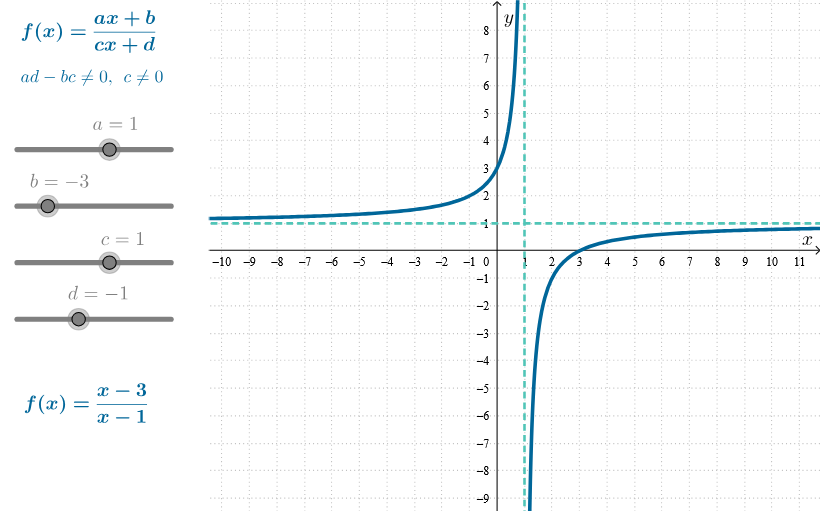
This GeoGebra example interactively demonstrates a homographic (rational) function by constructing and visualizing a hyperbola, highlighting its two branches and how the graph approaches its asymptotes. It focuses on key ideas such as homographic/rational function behavior, hyperbola geometry, asymptote properties (in the sense of limiting approach), and parameter-driven visualization. Construction centers on GeoGebra commands including Corner and Polygon to build the geometric/structural setup and Asymptote to generate and display the asymptotes; the scene is coordinated with predefined objects and parameters (e.g., objects like poli1, and text/labels such as butt1Text, butt3Text, textGen, textFun, plus parameters a, b, c, d, f, l1) to link controls to the function and annotations. Suitable for late high school through early university, for teaching function graphing, analytic geometry, and an introductory intuition for limits and asymptotic behavior.
GeoGebra Commands & Parameters
Corner(2) → C2Corner(3) → C3Polygon({C1, C2, C3, C4}) → poli1Asymptote(f) → l1
AI Drawing Prompt Reference
Draw an interactive hyperbola with its asymptotes, highlighting the two branches. First, construct a quadrilateral, then plot the hyperbola based on a rational function and display its asymptotes. Use parameters to control the position and shape of the hyperbola, and label key points and asymptotes to make the graph educational.
The prompt above was compiled from the original drawing commands and is for reference only.