
Fractions on the Number Line (Part 2)
Loading the math board and drawing, please wait…
In collections
Elementary School
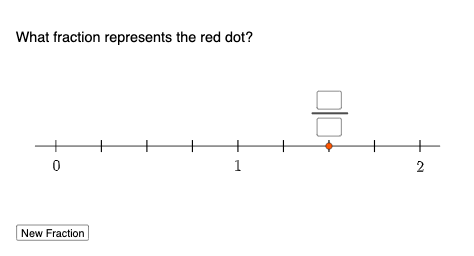
This example demonstrates fractions on the number line. Key mathematical concepts include fractions and rational numbers. Using GeoGebra commands such as Random, Sequence, and RandomElement, the example dynamically shows the position of fractions on the number line. Suitable for students in middle school and above to learn about fractions and rational numbers.
GeoGebra Commands & Parameters
Random(2, 10) → aSequence(1, (2 * a)) → l1RandomElement(l2) → bElement(l2, 1) → cSequence(Segment[(Element[l2, i], -0.03), (Element[l2, i], 0.03)], i, 0, (2 * a)) → l3, {NaN, 0.06, 0.06, 0.06, 0.06, 0.06, 0.06, 0.06, 0.06}Point(xAxis) → BPoint(xAxis) → CSegment(B, C) → fSegment((0, 0.03), (0, -0.03)) → gTextfield(m) → InputBox1Textfield(n) → InputBox2Segment(P, D) → h
AI Drawing Prompt Reference
Draw a number line from 0 to 10, with a point at every unit. Randomly select a point as the starting point, and draw points every unit from there until the end. Randomly choose two points on the number line as B and C, and connect them. Draw a vertical segment above the origin on the number line with a length of 0.06. Input two fractions as text boxes on the number line.
The prompt above was compiled from the original drawing commands and is for reference only.