
Fractions on a Number Line by Lillian Petersen
Loading the math board and drawing, please wait…
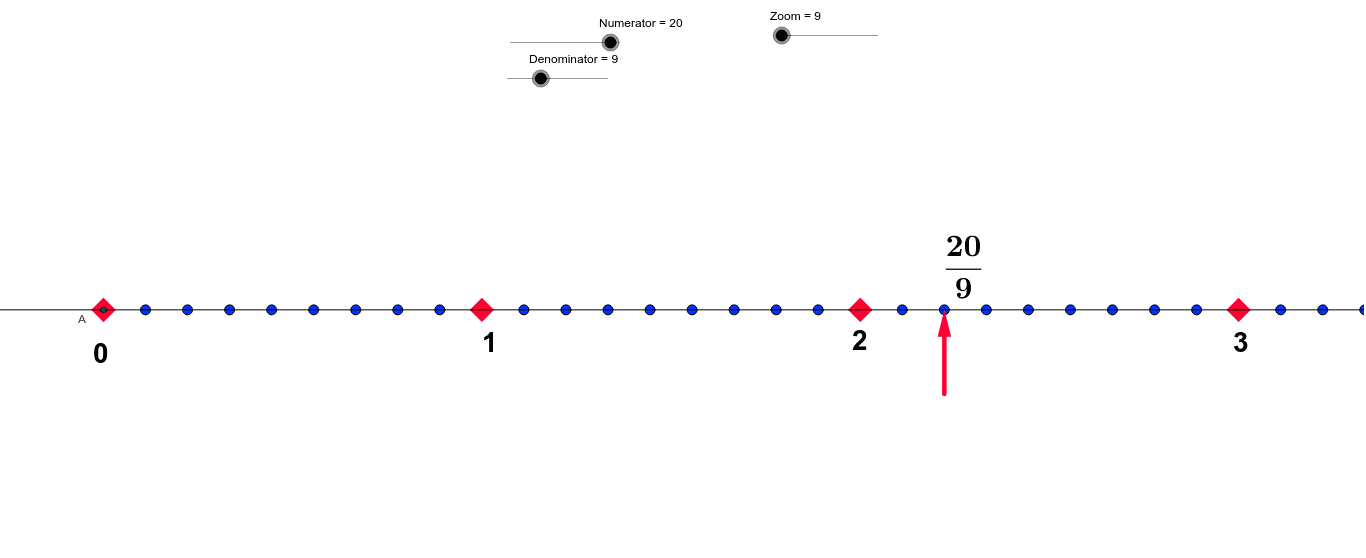
This GeoGebra example demonstrates how to visualize fractions on a number line, allowing users to dynamically adjust the numerator and denominator to see the fraction's position relative to integers and decimals. The core mathematical concepts include the meaning of fractions, the correspondence between points on a number line and real numbers, ratios and proportions, and conversions among fractions, decimals, and percentages. The construction uses GeoGebra commands such as Intersect, Point, Line, Vector, Sequence, and Element to build the number line, fraction points, auxiliary segments, and text labels, with sliders controlling the numerator and denominator to update the fraction's position and displayed text in real time. It is suitable for upper elementary and middle school students learning fraction concepts, as well as for teacher demonstrations to help students develop number sense and understand the continuous distribution of fractions on the number line.
GeoGebra Commands & Parameters
Intersect(xAxis, yAxis) → APoint(xAxis) → BLine(A, B) → aVector(C, D) → uSequence((d, 0), d, 0, 100, b) → list2Sequence((d, 0), d, 0, 100, Zoom) → list1Element(list1, Zoom) → E
AI Drawing Prompt Reference
Draw a number line with a horizontal axis, marking the origin and a reference point on the axis. From the origin, draw a segment to the reference point to indicate direction. Generate a series of equally spaced tick marks along the axis, with spacing determined by the denominator. Also generate a denser set of tick marks with spacing controlled by a zoom factor. From this denser set, select one specific point to represent the fraction's position on the line. Use two sliders to adjust the numerator and denominator, updating the fraction point and its displayed value in real time. The graphic should clearly show the fraction's location relative to integers and decimals, with labels for the fraction, decimal, and percentage.
The prompt above was compiled from the original drawing commands and is for reference only.