
Fraction Division by Steve Phelps
Loading the math board and drawing, please wait…
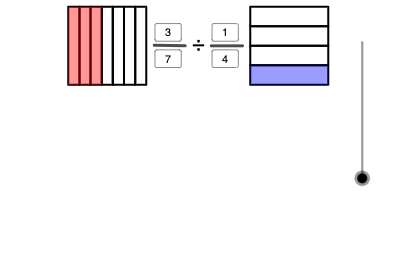
This example demonstrates the geometric intuition and calculation process of fraction division. It involves core mathematical concepts such as fraction operations, division principles, and geometric construction. The construction uses GeoGebra commands like Point, Polygon, Textfield, Sequence, If, Segment, Vector, Mod with objects including n, I, E, A, B, poly1, f, g, h, i, C, D, F, poly2, j, k, l, m, G, H, d11, d1, d22, d2, n11, n1, n22, n2, l1, l2, l3, l4, l5, l6, l7, J, l8, K, I5, l9. It is suitable for middle school and above mathematics teaching, visualizing and understanding fraction division.
GeoGebra Commands & Parameters
Point(xAxis) → IPolygon(A, B, 4) → poly1, f, g, h, i, C, DPolygon(E, F, 4) → poly2, j, k, l, m, G, HTextfield(d11) → d1Textfield(d22) → d2Textfield(n11) → n1Textfield(n22) → n2Sequence(H + (a / d11 * (G - H)), a, 0, d11) → l1, {(-0.875, 1.75), (-0.7678571428571429, 1.75), (-0.6607142857142857, 1.75), (-0.5535714285714286, 1.75), (-0.44642857142857145, 1.75), (-0.3392857142857143, 1.75), (-0.2321428571428572, 1.75), (-0.125, 1.75)}Sequence(A + (a / d22 * (D - A)), a, 0, d22) → l2, {(0.875, 1), (0.875, 1.1875), (0.875, 1.375), (0.875, 1.5625), (0.875, 1.75)}Sequence(E + (a / d11 * (F - E)), a, 0, d11) → l3, {(-0.875, 1), (-0.7678571428571429, 1), (-0.6607142857142857, 1), (-0.5535714285714286, 1), (-0.44642857142857145, 1), (-0.3392857142857143, 1), (-0.2321428571428572, 1), (-0.125, 1)}Sequence(B + (a / d22 * (C - B)), a, 0, d22) → l4, {(1.625, 1), (1.625, 1.1875), (1.625, 1.375), (1.625, 1.5625), (1.625, 1.75)}Sequence(Polygon[l1(a), l1(a + 1), l3(a + 1), l3(a)], a, 1, d11) → l5, {0.0803571428571429, 0.0803571428571428, 0.0803571428571429, 0.08035714285714285, 0.08035714285714285, 0.0803571428571428, 0.0803571428571429}Sequence(Polygon[l2(a), l2(a + 1), l4(a + 1), l4(a)], a, 1, d22) → l6, {0.140625, 0.140625, 0.140625, 0.140625}Sequence(Polygon[l1(a), l1(a + 1), l3(a + 1), l3(a)], a, 1, n11) → l7, {0.0803571428571429, 0.0803571428571428, 0.0803571428571429}If(0 ≤ n ≤ 1, Dilate[E, 1 - n, I], I) → JSequence(Polygon[l2(a), l2(a + 1), l4(a + 1), l4(a)], a, 1, n22) → l8, {0.140625}Point(xAxis) → KIf(0 ≤ n ≤ 1, Translate[l7, J - E], Translate[l7, I - E]) → l9If(0 ≤ n ≤ 1, Translate[l5, J - E], Translate[l5, I - E]) → l10If(0 ≤ n ≤ 1, Translate[l6, Dilate[A, 1 - n, I] - A], Translate[l6, I - A]) → l11If(2 ≤ n ≤ 3, Dilate[E, 3 - n, K], K) → LIf(2 ≤ n ≤ 3, Dilate[A, 3 - n, K], K) → MIf(2 ≤ n ≤ 3, Translate[l6, M - A], Translate[l6, K - A]) → l13If(2 ≤ n ≤ 3, Translate[l5, L - E], Translate[l5, K - E]) → l14If(2 ≤ n ≤ 3, Translate[l8, M - A], Translate[l8, K - A]) → l12Segment(N, O) → pSegment(P, Q) → qVector(R, S) → uMod((n11 * d22), (n22 * d11)) → W1
AI Drawing Prompt Reference
Create a dynamic diagram illustrating fraction division geometrically. Place two reference points on the x-axis. Construct two squares, one on the left and one on the right, each divided into equal vertical or horizontal strips according to the denominator value, with some strips colored to represent the numerator. Add several text input fields to adjust numerator and denominator values. Use a slider to animate how strips translate or scale when the numerator or denominator changes, visually showing the division result. Finally, mark key proportional relationships with segments and vectors.
The prompt above was compiled from the original drawing commands and is for reference only.