
Fraction Addition Demonstration by Ramaswamy kodam
Loading the math board and drawing, please wait…
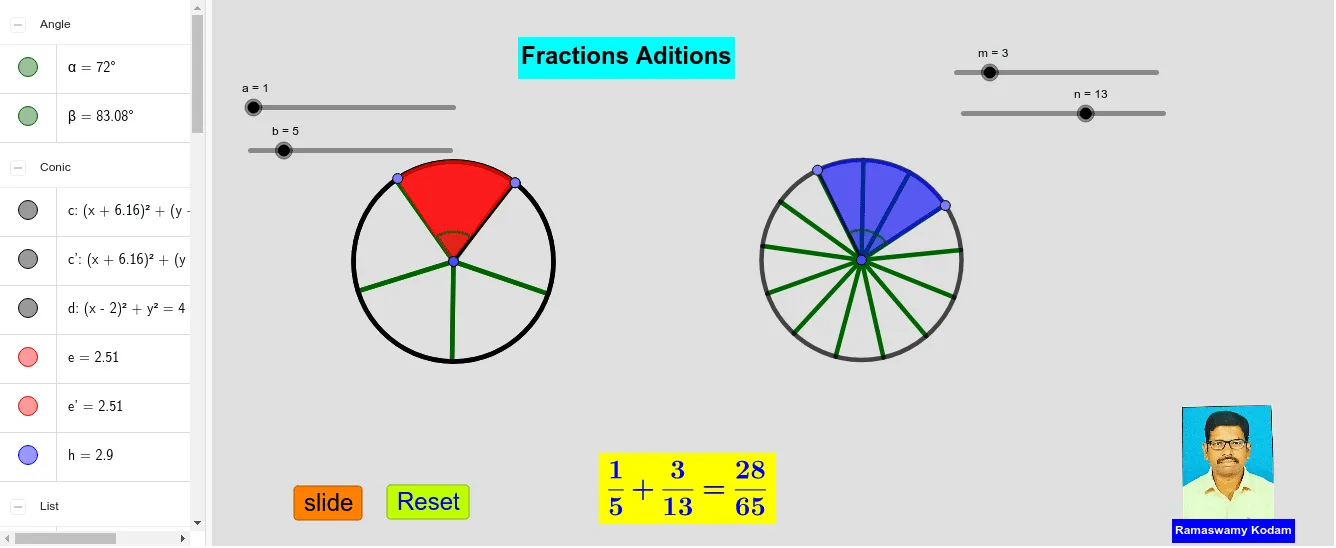
This example visually demonstrates the concept of adding fractions through geometric constructions. It involves core mathematical concepts such as fraction operations, geometric figure construction, vectors, and transformations. Key GeoGebra commands and objects used include Circle, Point, Segment, Sequence, Rotate, Angle, CircleSector, LCM, Vector, and Translate. Suitable for middle school students and math enthusiasts to understand the geometric interpretation and calculation methods of fraction addition.
GeoGebra Commands & Parameters
Circle(A, 2) → cCircle(B, 2) → dPoint(c) → CPoint(d) → DSegment(A, C) → fSegment(B, D) → gSequence(Segment[A, Rotate[C, f°, A]], f, (360°) / b, 360, 360 / b) → l1Sequence(Segment[B, Rotate[D, g°, B]], g, (360°) / n, 360, 360 / n) → l2Rotate(C, (360° * a / b), A) → C'Angle(C, A, C') → αRotate(D, (-((360° * m / n))), B) → D'Angle(D', B, D) → βCircleSector(A, C, C') → eCircleSector(B, D', D) → hLCM(b, n) → kVector(A, V) → uTranslate(c, u) → c'Translate(e, u) → e'Translate(A, u) → A'Translate(C, u) → C'_1Segment(A', C'_1) → f'Translate(l1, u) → l1'
AI Drawing Prompt Reference
Draw two circles with radius 2, label their centers as starting and ending points, and connect the starting point to points on the circles to form segments. Rotate the segments around the starting point by specific angles repeatedly to create multiple sectors, demonstrating the geometric construction of fraction addition. Connect the starting and ending points after rotation to form new segments and draw the sector regions. Use the least common multiple and vectors to translate the shapes, illustrating the geometric interpretation of fraction addition.
The prompt above was compiled from the original drawing commands and is for reference only.