
Integer Addition with Counters: Visualizing Discrete Counting
Loading the math board and drawing, please wait…
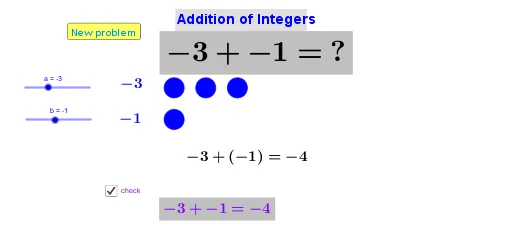
This example demonstrates how to visualize integer addition using counter-style discrete steps, linking the counting process to the intuition behind probability-counting models. The main concepts include: integer arithmetic expressed geometrically, mapping counters to discrete step counts, and developing insight related to distributions such as binomial and hypergeometric distribution. Construction-wise, the GeoGebra setup relies on Vector and Translate to build and move vector-based step/counter elements (e.g., points B1–B11, A1–A9, and auxiliary objects A, B, u, v), uses If to conditionally control the counter states and the generation logic, and employs Random to produce discrete random outcomes. Text objects (text1, text2) are used to display current integer/counter values. Suitable for middle school to early university levels, especially for teaching discrete counting, integer addition, and introductory probability-statistics via interactive visualization.
GeoGebra Commands & Parameters
Vector(A, B) → uVector(A, B) → vTranslate(A1, v) → A1'Translate(A2, v) → A2'Translate(A3, v) → A3'Translate(A4, v) → A4'Translate(A5, v) → A5'Translate(A6, v) → A6'Translate(A7, v) → A7'Translate(A8, v) → A8'Translate(A9, v) → A9'Vector(A, B) → wTranslate(A10, w) → A10'If(b < 0, "(" + b + ")", "" + b) → text3Random(-10, 10) → eRandom(-10, 10) → f
AI Drawing Prompt Reference
Create a geometric illustration for discrete counting and integer addition intuition. Start with points A and B on a plane, then define two displacement directions from A toward B and use them to translate a sequence of points A1 through A9 along that direction, producing corresponding points A1' through A9'. Add one more point A10 and translate it along a (same-direction) vector to obtain A10'. Include a text element that conditionally formats a value b, showing parentheses when b is negative and plain b otherwise. Also generate two discrete random integers e and f in the range -10 to 10, and display the current integer/counter values using text objects.
The prompt above was compiled from the original drawing commands and is for reference only.