
Folding a Triangle into a Boat: Rotation and Polygon Construction
Loading the math board and drawing, please wait…
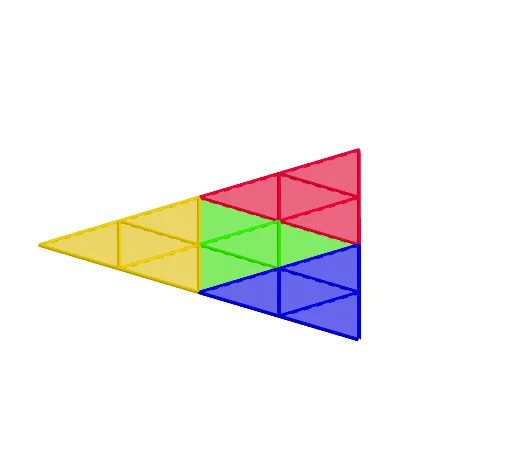
This GeoGebra applet demonstrates how a triangle can be successively folded (rotated) into the shape of a boat, visually showing the dynamic transformation from a flat polygon to a folded 3D-like structure. The core mathematical concepts include properties of triangles, rotation transformations, polygon construction and combination, as well as symmetry and angle relationships inherent in origami. Construction highlights: using the Polygon command to create the initial triangle poly1, then using Line to build auxiliary lines, and applying the Rotate command to repeatedly rotate the triangle and its parts, generating a series of new polygons (poly2 through poly8) and corresponding vertices (B through I) to progressively form the hull and sail outlines. This applet is suitable for middle school and above, helping students understand geometric transformations, polygon assembly, and the mathematical principles behind origami, and can serve as cross-disciplinary material connecting math and hands-on crafts.
GeoGebra Commands & Parameters
Polygon(A, B, 3, xOyPlane) → poly1, f, g, h, CPolygon(A, C, 3, xOyPlane) → poly2, i, j, k, DPolygon(C, B, 3, xOyPlane) → poly3, l, m, n, EPolygon(A, D, 3, xOyPlane) → poly4, p, q, r, FPolygon(E, B, 3, xOyPlane) → poly5, s, t, a, GPolygon(D, C, 3, xOyPlane) → poly6, b, c, d, HPolygon(C, E, 3, xOyPlane) → poly7, e, f_1, g_1, IPolygon(I, H, 3, xOyPlane) → poly8, h_1, i_1, j_1, JPolygon(H, I, 3, xOyPlane) → poly9, k_1, l_1, m_1, KPolygon(A, F, 3, xOyPlane) → poly10, n_1, p_1, q_1, LPolygon(B, A, 3, xOyPlane) → poly11, r_1, s_1, t_1, MPolygon(G, B, 3, xOyPlane) → poly12, a_1, b_1, c_1, NPolygon(M, N, 3, xOyPlane) → poly13, d_1, e_1, f_2, OPolygon(L, M, 3, xOyPlane) → poly14, g_2, h_2, i_2, PPolygon(L, F, 3, xOyPlane) → poly15, j_2, k_2, l_2, QPolygon(G, N, 3, xOyPlane) → poly16, m_2, n_2, p_2, RLine(F, L) → q_2Line(H, I) → r_2Line(D, M) → s_2Line(E, J) → t_2Rotate(poly6, (-((o * (π - acosd(-1 / 3))))), t_2) → poly6'Rotate(poly4, (-((o * (π - acosd(-1 / 3))))), s_2) → poly4'Line(G, N) → a_2Rotate(poly16, (o * (π - acosd(-1 / 3))), a_2) → poly16'Rotate(poly15, (-((o * (π - acosd(1 / 3))))), q_2) → poly15'Rotate(poly9, (o * (π - acosd(1 / 3))), r_2) → poly9'Line(E, M) → b_2Rotate(poly13, (u * acosd(-1 / 3)), b_2) → poly13'Rotate(poly12, (u * acosd(-1 / 3)), b_2) → poly12'Rotate(poly16', (u * acosd(-1 / 3)), b_2) → poly16''Rotate(poly5, (u * acosd(-1 / 3)), b_2) → poly5'Line(L, A) → c_2Rotate(poly2, (u * (π - acosd(-1 / 3))), c_2) → poly2'Rotate(poly6', (u * (π - acosd(-1 / 3))), c_2) → poly6''Rotate(poly4', (u * (π - acosd(-1 / 3))), c_2) → poly4''Rotate(poly8, (u * acosd(-1 / 3)), c_2) → poly8'Rotate(poly9', (u * acosd(-1 / 3)), c_2) → poly9''Rotate(poly15', (u * acosd(-1 / 3)), c_2) → poly15''Rotate(poly10, (u * acosd(-1 / 3)), c_2) → poly10'Rotate(poly15'', (-((v * (π - (2 * acosd(1 / 3)))))), s_2) → poly15'''Rotate(poly10', (-((v * (π - (2 * acosd(1 / 3)))))), s_2) → poly10''Rotate(poly14, (-((v * (π - (2 * acosd(1 / 3)))))), s_2) → poly14'Rotate(poly8', (-((v * (π - (2 * acosd(1 / 3)))))), t_2) → poly8''Rotate(poly7, (-((v * (π - (2 * acosd(1 / 3)))))), t_2) → poly7'Rotate(poly9'', (-((v * (π - (2 * acosd(1 / 3)))))), t_2) → poly9'''
AI Drawing Prompt Reference
Create a boat-like shape formed by folding multiple equilateral triangles. Start with a single triangle, then rotate it around its edges to generate a series of connected triangles, building the hull and sail outlines. The final structure shows symmetric geometric transformations, with overlapping and joined triangular faces, resembling an origami boat. Emphasize straight edges, triangular facets, and angle relationships.
The prompt above was compiled from the original drawing commands and is for reference only.