
Finding the Area of a Parallelogram
Loading the math board and drawing, please wait…
In collections
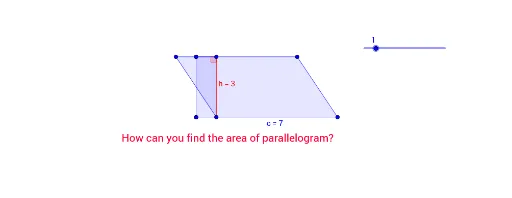
Creating Height and Area Relation in Parallelogram
This example demonstrates how to find the area of a parallelogram using vector construction and triangle decomposition. Key math concepts include vectors, triangle area formula, parallelogram properties, and trigonometry (for angle calculations). GeoGebra commands/objects used are Polygon, Point, Segment, Vector, Translate, and Angle. Suitable for high school geometry students to understand and calculate parallelogram areas.
GeoGebra Commands & Parameters
Polygon(A, B, C, D) → çokgen1, a, b, c, dPolygon(E, F, G) → çokgen2, g, e, fPoint(Circle[J, n]) → KSegment(J, K) → h_1Vector(J, K) → uTranslate(E, u) → E'Translate(F, u) → F'Translate(G, u) → G'Polygon(E', F', G') → çokgen2', g', h, f'Angle(E', F', G') → α
AI Drawing Prompt Reference
Draw a parallelogram and demonstrate how to calculate its area using vector construction and triangle decomposition. First, sketch the parallelogram, then find the midpoint of one side and draw a perpendicular line to the opposite side to represent the height. Next, use vector translation to construct a congruent triangle, and calculate its area to find the parallelogram's area. Finally, label the key angles and vectors to show the application of trigonometry in area calculation.
The prompt above was compiled from the original drawing commands and is for reference only.