
Drawing Height in Parallelogram and Constructing Area Relation
Loading the math board and drawing, please wait…
In collections
Creating Height and Area Relation in Parallelogram
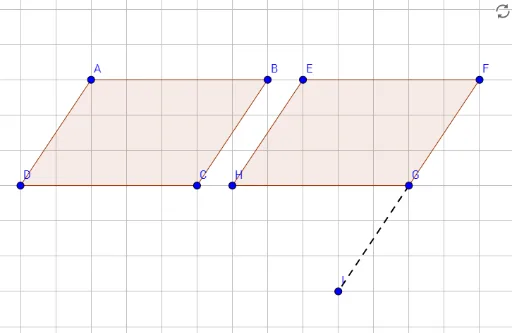
This GeoGebra example demonstrates how to draw heights in a parallelogram and construct auxiliary shapes to reveal the area relationship. The core mathematical concepts include properties of parallelograms, definition of altitude, area formulas, and area decomposition/equivalence. Construction details: using the Polygon command to create the parallelogram (vertices A, B, C, D forming polygon çokgen1), then using Segment commands to draw perpendiculars from vertices to opposite sides, obtaining foot points E, F, G, H, and constructing a second polygon çokgen2 from these points. Additional segments (a, b, c, d, e, f, g, h, i) connect relevant points, allowing visual comparison of areas (e.g., rectangle vs. parallelogram) to derive the area formula. Suitable for middle school geometry, helping students intuitively understand that the area of a parallelogram equals base times height, and how dissection and rearrangement (cut-and-paste) can transform shapes to prove area equivalence.
GeoGebra Commands & Parameters
Polygon(A, B, C, D) → çokgen1, a, b, c, dPolygon(E, F, G, H) → çokgen2, e, f, g, hSegment(G, I) → i
AI Drawing Prompt Reference
Draw a parallelogram ABCD, then drop perpendiculars from each vertex to the opposite sides to get points E, F, G, H. Use E, F, G, H as vertices to draw another parallelogram EFGH. Finally, connect relevant points like G and I to visually compare area relationships and understand that the area of a parallelogram equals base times height.
The prompt above was compiled from the original drawing commands and is for reference only.