
Calculate the Area of a Parallelogram
Loading the math board and drawing, please wait…
In collections
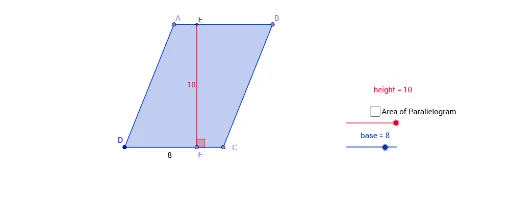
Creating Height and Area Relation in Parallelogram
This GeoGebra example demonstrates how to calculate the area of a parallelogram by constructing the shape and measuring its base and height. The core mathematical concept is the parallelogram area formula (area = base × height), along with geometric elements such as perpendicular lines and intersection points. Construction steps involve using Point to create vertices, Segment to draw sides, OrthogonalLine to construct the height, Polygon to form the parallelogram, PointIn to mark interior points, Intersect to find intersections, and Angle to label angles. The software automatically computes the area. Suitable for middle school geometry lessons to help students intuitively understand the area formula and its application.
GeoGebra Commands & Parameters
Point(Circle[D, base]) → CSegment(D, C) → fPoint(Circle[D, height]) → C_1Segment(D, C_1) → gOrthogonalLine(C_1, g) → h_1Point(h_1) → APoint(Circle[A, base]) → BSegment(A, B) → jPolygon(D, A, B, C) → çokgen1, a, d, e, bPointIn(çokgen1) → Noktaçokgen1Point(f) → FOrthogonalLine(F, h_1) → hIntersect(h_1, h) → ESegment(E, F) → mSegment(E, A) → pAngle(C, F, E) → α
AI Drawing Prompt Reference
Draw a parallelogram with point D as one of its base vertices, draw the base f through point C, draw the height g perpendicular to f from point C_1, then draw the other two sides j and m of the parallelogram, and finally place a point Noktaçokgen1 inside the parallelogram.
The prompt above was compiled from the original drawing commands and is for reference only.