
Interactive Exploration of Regular Star Polygons
Loading the math board and drawing, please wait…
In collections
Euclidean Geometry
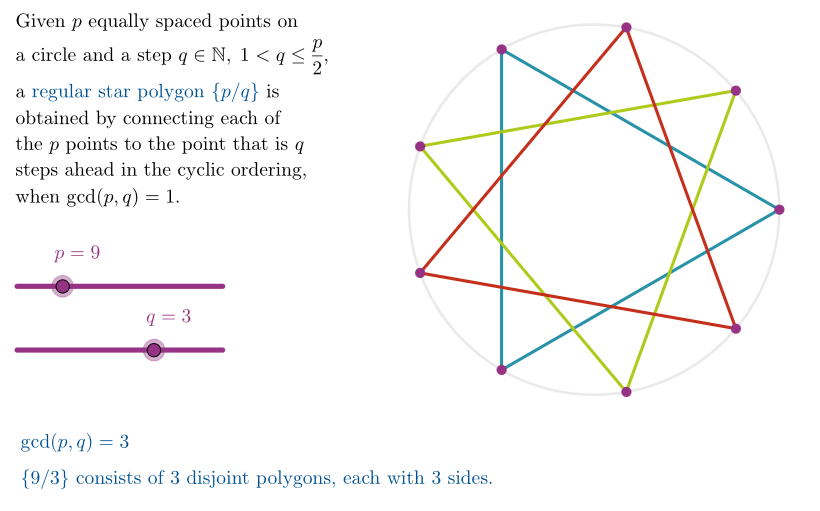
This example demonstrates how to interactively generate regular star polygons in GeoGebra and visually explore their key properties, especially the interior-angle-sum behavior. It centers on concepts such as regular star polygon construction from evenly spaced vertices, the step size/connection rule, coprimality (checked via gcd-related logic) to determine valid star cycles, and geometric reasoning for interior angles. Construction highlights include using Point for key points (e.g., the center and chosen vertices), Sequence to build the ordered vertex set along a circle, and Polygon to draw the star edges. GCD and Element are used to extract/validate parameters and elements, while Mirror helps with symmetric constructions where needed. Prebuilt objects and helpers (e.g., quickStar, quickAllSegm, allCycles, allPoli, star1–star9, areCoprime, allPts) support rapid generation and labeling, and sliders (such as pSli/qSli/qMax) drive parameter changes and quick demonstrations. Suitable for advanced middle school through early university geometry lessons and for activities on geometric construction, angles, and parameter-driven mathematical deduction.
GeoGebra Commands & Parameters
Point(xAxis) → PEEPSTMirror(PP1, yAxis) → PP2Mirror(PP2, xAxis) → PP3Mirror(PP1, xAxis) → PP4Polygon({PP1, PP2, PP3, PP4}) → peepSequence(Rotate[(1, 0), ((k * 2) * pi / pSli)], k, 0, pSli - 1) → allPtsPolygon(Sequence[Element[allPts, 1 + Mod[((k - 1) * qSli), pSli]], k, 1, pSli]) → quickStarSequence(Segment[Element[allPts, i], Element[allPts, 1 + Mod[i - 1 + qSli, pSli]]], i, 1, pSli) → quickAllSegmGCD(pSli, qSli) → emmecidiSequence(Sequence[Element[allPts, 1 + Mod[((k - 1) * qSli) + j, pSli]], k, 1, pSli / emmecidi], j, 0, emmecidi - 1) → allCyclesSequence(Polygon[Element[allCycles, j + 1]], j, 0, emmecidi - 1) → allPoliElement(allPoli, 1) → star1Element(allPoli, 2) → star2Element(allPoli, 3) → star3Element(allPoli, 4) → star4Element(allPoli, 5) → star5Element(allPoli, 6) → star6Element(allPoli, 7) → star7Element(allPoli, 8) → star8Element(allPoli, 9) → star9Element(allPoli, 10) → star10Element(allPoli, 11) → star11Element(allPoli, 15) → star15Element(allPoli, 12) → star12Element(allPoli, 13) → star13Element(allPoli, 14) → star14
AI Drawing Prompt Reference
Draw a regular star polygon with vertices evenly spaced on a circle, where the number of vertices and the step size are controlled by sliders. First place all equally spaced points on the unit circle, then connect them sequentially with a fixed step to form the star path. If the step and vertex count are not coprime, the star splits into several separate polygonal cycles, which should be drawn individually. Show all connecting segments, mark the center and a few symmetric auxiliary points. Use different colors for distinct cycles and illustrate how the sum of interior angles changes with parameters.
The prompt above was compiled from the original drawing commands and is for reference only.