
Pythagoras Tree Script: Iterative Rotation Fractal Construction
Loading the math board and drawing, please wait…
In collections
Pythagoras Fractal Trees constructions
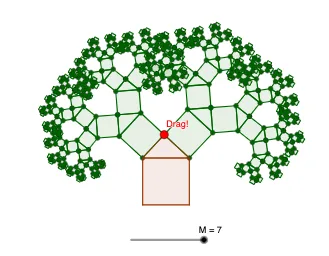
This GeoGebra example demonstrates how the Pythagoras tree fractal can be generated from a starting right-triangle configuration by repeatedly rotating and attaching new triangle branches. The key mathematical ideas include fractal geometry (self-similarity via iteration), right-triangle relationships inspired by the Pythagorean theorem, and transformation-based construction using angles, midpoints, and semicircles. Construction highlights: Sequence controls the recursion depth; Zip and Remove help manage sets of created objects across iterations; Polygon builds triangle/polygon pieces; Midpoint computes key split points; Semicircle creates semicircular arcs used in the geometry; Point and Angle define critical vertices and angle parameters; Rotate together with BasePoints applies rotation iteratively around chosen pivot points; Join combines segments into the final structured figure. It uses layered point collections (e.g., pointsBase, points1, points2) and naming/visibility variables to manage multiple branches. Suitable for secondary school through early university topics on iterative geometry, transformation geometry, and introductory fractal visualization.
GeoGebra Commands & Parameters
Sequence(1, M) → LmSequence(1, N) → LNZip("S" + (Text[n]), n, LN) → SnameSequence(k, k, 1, 2^(2), 2) → S1Sequence(k, k, 1, 2^(3), 2) → S2Sequence(k, k, 1, 2^(4), 2) → S3Sequence(k, k, 1, 2^(5), 2) → S4Sequence(k, k, 1, 2^(6), 2) → S5Sequence(k, k, 1, 2^(7), 2) → S6Sequence(k, k, 1, 2^(8), 2) → S7Remove(LN, {1}) → LKZip("T" + (Text[n]), n, LK) → TnameSequence(k, k, 1, 2^(3), 4) → T2Sequence(k, k, 1, 2^(4), 4) → T3Sequence(k, k, 1, 2^(5), 4) → T4Sequence(k, k, 1, 2^(6), 4) → T5Sequence(k, k, 1, 2^(7), 4) → T6Sequence(k, k, 1, 2^(8), 4) → T7Polygon(A, B, 4) → base, f, g, h, i, C, DMidpoint(C, D) → ESemicircle(D, C) → arcPoint(arc) → FAngle(C, E, F) → αRotate(C, α, E) → C'Rotate(C, α, E) → C'_1BasePoints(A, B, α) → points1Join(Zip[BasePoints[Element[points1, k], Element[points1, k + 1], α], k, S1]) → points2Join(Zip[BasePoints[Element[points2, k], Element[points2, k + 1], α], k, S2]) → points3Join(Zip[BasePoints[Element[points3, k], Element[points3, k + 1], α], k, S3]) → points4Join(Zip[BasePoints[Element[points4, k], Element[points4, k + 1], α], k, S4]) → points5Join(Zip[BasePoints[Element[points5, k], Element[points5, k + 1], α], k, S5]) → points6Join(Zip[BasePoints[Element[points6, k], Element[points6, k + 1], α], k, S6]) → points7Join(Zip[BasePoints[Element[points7, k], Element[points7, k + 1], α], k, S7]) → points8Zip(Polygon[Element[points1, k], Element[points1, k + 1], 4], k, S1) → squares1Zip(Polygon[Element[points2, k], Element[points2, k + 1], 4], k, S2) → squares2Zip(Polygon[Element[points3, k], Element[points3, k + 1], 4], k, S3) → squares3Zip(Polygon[Element[points4, k], Element[points4, k + 1], 4], k, S4) → squares4Zip(Polygon[Element[points5, k], Element[points5, k + 1], 4], k, S5) → squares5Zip(Polygon[Element[points6, k], Element[points6, k + 1], 4], k, S6) → squares6Zip(Polygon[Element[points7, k], Element[points7, k + 1], 4], k, S7) → squares7Polygon(points1) → triangles1Zip(Polygon[Element[points2, k], Element[points2, k + 1], Element[points2, k + 3]], k, T2) → triangles2Zip(Polygon[Element[points3, k], Element[points3, k + 1], Element[points3, k + 3]], k, T3) → triangles3Zip(Polygon[Element[points4, k], Element[points4, k + 1], Element[points4, k + 3]], k, T4) → triangles4Zip(Polygon[Element[points5, k], Element[points5, k + 1], Element[points5, k + 3]], k, T5) → triangles5Zip(Polygon[Element[points6, k], Element[points6, k + 1], Element[points6, k + 3]], k, T6) → triangles6Zip(Polygon[Element[points7, k], Element[points7, k + 1], Element[points7, k + 3]], k, T7) → triangles7
AI Drawing Prompt Reference
Start with a base segment and construct a square on it. Above the square, draw a semicircle using the top side as diameter. Pick a point on the semicircle and connect it to the midpoint of the top side, forming a right triangle; measure the angle at the midpoint. Use this angle to rotate the square around the midpoint, generating new branch points. Repeat the process for each new branch: build squares on adjacent point pairs, add semicircles above them, pick points, and rotate to create the next level. Iterate several levels to produce a fractal tree of shrinking squares and right triangles, known as the Pythagoras tree.
The prompt above was compiled from the original drawing commands and is for reference only.