
Pythagoras Tree Geometry Tool
Loading the math board and drawing, please wait…
In collections
Pythagoras Fractal Trees constructions
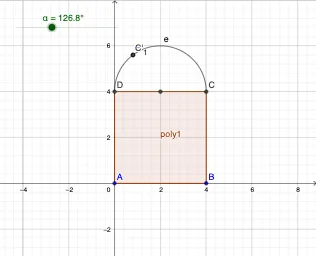
This example demonstrates how to generate a Pythagoras tree fractal by iteratively applying geometric constructions and transformations, producing an evolving pattern of right triangles. It highlights core ideas related to the Pythagorean theorem mindset, right-triangle configuration, fractal iteration, and geometry transformations such as rotation. Construction workflow in GeoGebra: Polygon is used to build the initial polygon/triangle, Midpoint computes key segment midpoints, Semicircle draws semicircular arcs as auxiliary geometry, Point places defining vertices, and Rotate performs rotational transformations to create the next generations of branches. Named points (e.g., A, B, C, D, E) and parameters like the angle α are used to control the construction. Suitable for middle and high school learners and for math classes focused on geometric construction, iterative processes, and fractals.
GeoGebra Commands & Parameters
Polygon(A, B, 4) → poly1, a, b, c, d, C, DMidpoint(C, D) → ESemicircle(D, C) → ePoint(e) → FRotate(C, α, E) → C'Rotate(C, α, E) → C'_1
AI Drawing Prompt Reference
Create a Pythagoras-tree style fractal geometry made of right triangles. Start with an initial polygon/triangle configuration using a few key vertices and draw its boundary. Construct the midpoint of one segment to serve as the pivot for branching. Over the same segment, draw a semicircle as an auxiliary arc and place a defining point on that arc. Then rotate the relevant vertex around the pivot by a controllable angle α to obtain the next corresponding point. Repeat the same rotation one more time so the second generation branch appears, showing the iterative growth pattern of the right-triangle structure.
The prompt above was compiled from the original drawing commands and is for reference only.