
Polygon Flower: Sequence-Driven Polygon Construction with Angles
Loading the math board and drawing, please wait…
In collections
Flowers and Polygons -IT
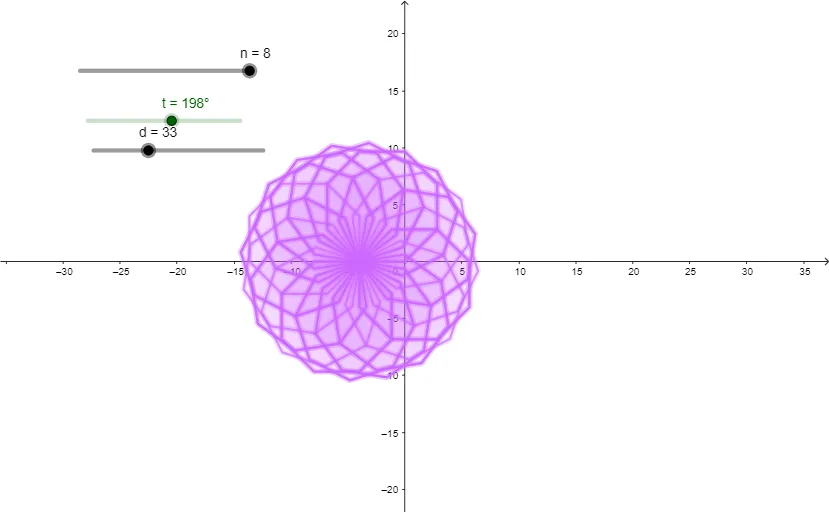
This example demonstrates how a “polygon flower” artwork can be generated by building a chain of polygon vertices that follow a sequence and orientation rule, producing a layered, often symmetric visual pattern. It highlights key ideas in geometry: constructing polygons by connecting generated vertex points, using angles to control direction, and using sequences (Sequence) to parameterize where points land. From the construction summary, the GeoGebra workflow centers on the commands Polygon and Sequence, together with objects representing parameter values (such as n, t, d) and multiple generated points/parts (A, B, C, D, …, poly1, poly2, and intermediate points/labels like f, g, h, …) that together define successive polygon edges to form the flower-like structure. Suitable for secondary school through early college, especially for lessons on geometric construction, parameterized geometry, and sequence-based graphing/visualization.
GeoGebra Commands & Parameters
Polygon(A, B, n) → poly1, f, D, E, F, G, H, g, h, i, j, k, l, m, CSequence(Rotate[poly1, (t * k), A], k, 0, d) → poly1'
AI Drawing Prompt Reference
Draw a flower-like pattern made of multiple polygons. Each polygon is controlled by angles to determine direction, and their positions are parameterized by a sequence. Construct the pattern starting from the center, adding polygons step by step to create a symmetric visual effect. Ensure that polygons are connected correctly and angles are consistent to achieve a layered, flower-like appearance.
The prompt above was compiled from the original drawing commands and is for reference only.