
Inclined Plane Free Fall
Loading the math board and drawing, please wait…
In collections
The Domain of the Time (intuitive kinematics)
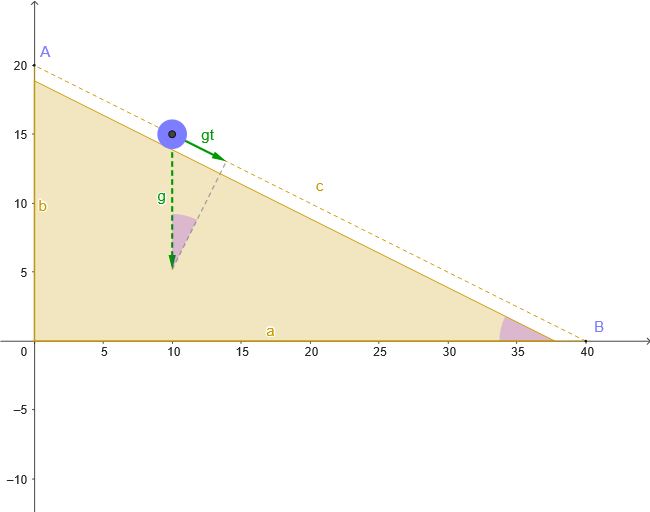
This example demonstrates the free fall of an object on an inclined plane. Key mathematical concepts include vectors, angles, similar triangles, and geometric construction. Using GeoGebra commands such as Point, Polygon, Segment, UnitVector, etc., the motion trajectory and velocity changes of the object are dynamically displayed. Suitable for high school physics and mathematics education.
GeoGebra Commands & Parameters
Point(Ray[(0, 0), (1, 0)]) → BPoint(Ray[(0, 0), (0, 1)]) → APolygon((0, 0), B, A) → tri, a_{1}, c_{1}, b_{1}Segment(B, A) → cPoint(c) → MUnitVector(c_{1}) → nSegment(M + g, M + gt) → sAngle(M + gt, M + g, M) → βCircle(M, rb) → dPolygon((0, 0), B', A') → tri', a, c', bAngle(A', B', (0, 0)) → α
AI Drawing Prompt Reference
Create a combined geometry-and-motion diagram on a coordinate plane: start from the origin with two rays forming an inclined-plane triangle, showing its vertices and the connecting sides to establish the reference geometry. Choose a point on this inclined structure as the motion start location, then draw a circle centered at that point with a specified radius. From the same point, add a displacement/trajectory segment representing motion along a time step under gravity, and mark the relevant angle between the displacement direction and the vertical reference through the origin (or equivalently, with the origin as the reference point). Also include a second, corresponding triangle arrangement (e.g., mirrored/paired with the initial one) and label the additional angle to compare the two relative configurations.
The prompt above was compiled from the original drawing commands and is for reference only.