
Finding Distance in the Coordinate Plane: Quick Conceptual Practice
Loading the math board and drawing, please wait…
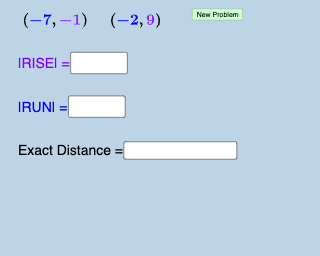
This example demonstrates how to calculate the distance between two points in the coordinate plane. It involves core mathematical concepts such as coordinate geometry and the Pythagorean Theorem. The construction uses GeoGebra commands and objects like Random, SurdText, Distance, and Textfield to generate random points and compute distances, aiding in the visual understanding of the distance formula. Suitable for middle school and above students for practicing coordinate geometry concepts.
GeoGebra Commands & Parameters
Random(-10, 10) → aRandom(-10, 10) → bRandom(-10, 10) → cRandom(-10, 10) → dSurdText(Distance[A, B]) → text1Distance(A, B) → iTextfield(j) → InputBox1Textfield(k) → InputBox2Textfield(l) → InputBox3
AI Drawing Prompt Reference
Create a coordinate plane with four randomly generated integer points in the range from −10 to 10, grouped into two point pairs for a distance-practice setup. Display the distance between the first pair of points as a formatted surd-style text label on the graph, so the distance formula is visually represented. Add three text input boxes for the user to enter or compare the related values/expressions. Build it by first generating the random points, then computing the distance between the chosen pair and placing the corresponding distance text, and finally adding the three input fields.
The prompt above was compiled from the original drawing commands and is for reference only.