
Find Items to Match Ratio
Loading the math board and drawing, please wait…
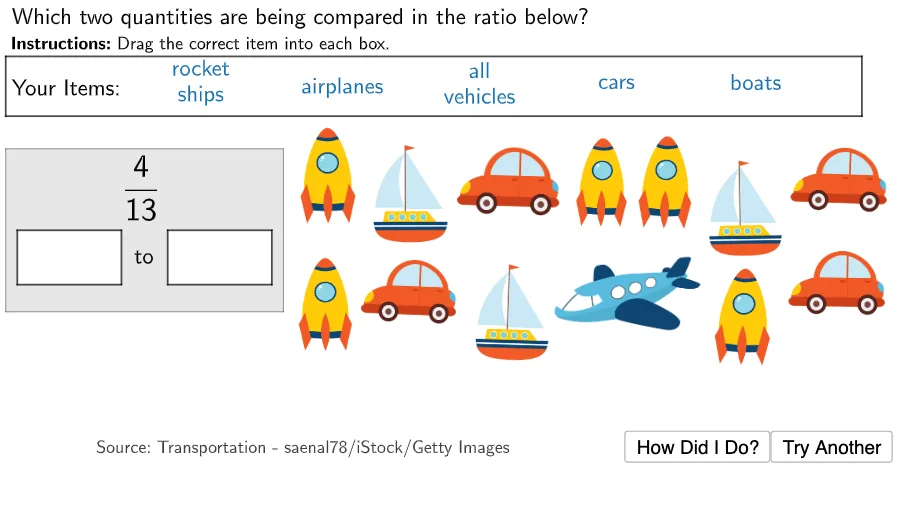
This example demonstrates how to find items that match a given ratio through geometric construction. Key mathematical concepts include ratio and random experiments. Using GeoGebra commands such as Polygon, Point, and Ratio, students can understand and calculate ratio relationships. Suitable for middle school and above students to learn about ratios and probability.
GeoGebra Commands & Parameters
Polygon((0, 1), (4.8, 1), (4.8, 4), (0, 4)) → Ratio1Box, f, g, h, iPolygon((0, 5.7), (14.8, 5.7), (14.8, 4.6), (0, 4.6)) → ItemBox, n, p, q, rPolygon((0.2, 2.5), (2, 2.5), (2, 1.5), (0.2, 1.5)) → aBox, j, k, l, mPolygon((2.8, 2.5), (4.6, 2.5), (4.6, 1.5), (2.8, 1.5)) → bBox, s, t, a, bPolygon(Point1Centre, Point1Centre + (2, 0), Point1Centre + (2, -1), Point1Centre + (0, -1)) → DragBox1, p_1, q_1, r_1, d_2Polygon(Point2Centre, Point2Centre + (2, 0), Point2Centre + (2, -1), Point2Centre + (0, -1)) → DragBox2, s_1, t_1, a_1, e_2Polygon(Point3Centre, Point3Centre + (2, 0), Point3Centre + (2, -1), Point3Centre + (0, -1)) → DragBox3, b_1, c_1, d_1, f_3Polygon(Point4Centre, Point4Centre + (2, 0), Point4Centre + (2, -1), Point4Centre + (0, -1)) → DragBox4, e_1, f_2, g_2, g_3Polygon(Point5Centre, Point5Centre + (2, 0), Point5Centre + (2, -1), Point5Centre + (0, -1)) → DragBox5, h_2, i_2, j_2, h_3Polygon((10.2, 0.7), (10.35, 0.7), (10.35, 1.1), (10.2, 1.1)) → WhiteCover1, k_2, l_2, m_2, n_2Polygon((7, 2.6), (7, 3), (7.1, 3), (7.1, 2.6)) → WhiteCover2, p_2, q_2, r_2, s_2Polygon((13.6, 2.9), (13.6, 3.3), (13.75, 3.3), (13.75, 2.9)) → WhiteCover3, t_2, a_2, b_2, c_2
AI Drawing Prompt Reference
Draw a rectangle with a length of 4.8 and width of 3, located from (0,1) to (4.8,4). Below it, draw a larger rectangle with a length of 14.8 and width of 1.1, located from (0,5.7) to (14.8,4.6). Between the two rectangles, draw four smaller rectangles, each with a width of 2 and height of 1, located from (0.2,2.5) to (2,1.5), (2.8,2.5) to (4.6,1.5), (10.2,0.7) to (10.35,1.1), and (7,2.6) to (7,3). Finally, draw a small rectangle to the right of the larger rectangle with a length of 3.5 and width of 0.4, located from (13.6,2.9) to (13.75,3.3).
The prompt above was compiled from the original drawing commands and is for reference only.