
Exponential Function Graphing Quiz with Transformations
Loading the math board and drawing, please wait…
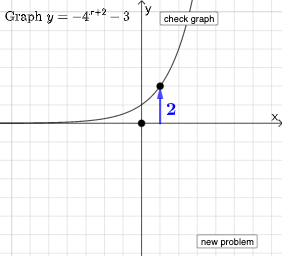
This interactive quiz demonstrates exponential functions in the form y=a·b^(x-h)+k and their various transformations, including translations, stretches, compressions, and reflections. Key mathematical concepts covered include domain and range of exponential functions, monotonicity, asymptotes, and the application of geometric transformations (translation, scaling, symmetry) to function graphs. Construction highlights: Using Random and RandomElement commands to generate random exponential function parameters (base b, coefficient a, horizontal shift h, vertical shift k), with Point, Vector, and If commands to create an interactive quiz interface, and buttons (button1, button2) for question switching and answer verification. Suitable for high school mathematics students, useful for consolidating exponential function concepts, exploring transformation patterns, and mathematics competition training.
GeoGebra Commands & Parameters
Random(0, 1) → qRandomElement({-5, -4, -3, -2, -1, 0, 1, 2, 3, 4, 5}) → mRandomElement({-5, -4, -3, -2, -1, 0, 1, 2, 3, 4, 5}) → lRandomElement({2, 3, 4, 5}) → jPoint(Line[A + (1, 0), A + (1, 1)]) → CVector(A + (1, 0), C) → uIf(c, (y(C) - y(A))^(x - h) + k, (-(abs(y(C) - y(A)))^(x - h)) + k) → fVector((0, 0), (x(A), 0)) → vVector((x(A), 0), A) → wIf(q ≟ 0, j^(x - l) + m, (-j^(x - l)) + m) → pIf(y(C) - y(A) ≟ j, "Base is correct.", "Base is not correct.") → text10If(h ≟ l, "Horizontal shift is correct.", "Horizontal shift is not correct.") → text11If(k ≟ m, "Vertical shift is correct.", "Vertical shift is not correct.") → text12If(q ≟ 0, 1, -1) → r
AI Drawing Prompt Reference
Draw a graph showing exponential functions and their transformations. The graph should include the basic curve of y=a·b^(x-h)+k, along with multiple variations obtained through translations, stretches, compressions, and reflections. Include sliders to adjust parameters a, b, h, and k, and buttons to switch questions and verify answers. Construction order: first draw the basic curve, then apply transformations to generate variations, and finally add interactive elements.
The prompt above was compiled from the original drawing commands and is for reference only.