
When the Exponent Becomes the Output: A Log Function Generator
Loading the math board and drawing, please wait…
In collections
Graphing Logarithmic Functions
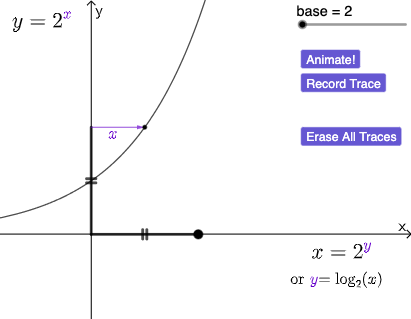
This example demonstrates a construction where the exponent is treated as the output, allowing students to generate and explore log-related function graphs interactively. The key ideas are the inverse relationship between exponential and logarithmic functions, representing functional dependencies in the coordinate plane, and understanding how parameter changes translate into geometric effects such as dilation and translation. The GeoGebra build leverages commands and objects from the construction summary: Point and Intersect to place critical points and determine intersections; Vector and Segment for directional/auxiliary geometry; RotateText to keep labels readable after transformations; Dilate and Translate as the main tools to map a base configuration into the target one; Circle for reference geometry; and Rotate for additional orientation adjustments. Together with the plotted/generated objects (e.g., g, h, f, p and related constructed points/lines) and interactive controls (buttons and text elements), the user can visually connect the “exponent-as-output” setup to the resulting logarithmic structure. Suitable for high school through early college, especially for lessons on inverse functions, exponential/log transformations, and graphing/log function intuition.
GeoGebra Commands & Parameters
Point(Ray[(0.1, 0), (1, 0)]) → AIntersect(g, eq1, (2, 1)) → BVector(A, B) → uSegment(A, C) → hIntersect(f, p, (0.9999999996174788, 2)) → FVector(C, F) → wRotateText(text1, pi / 2) → text4Dilate(C, If[0 < c ≤ 1, 1 - c, 0], A) → C'Vector(C, C') → vTranslate(F, v) → F'Circle(C', Distance[C, F]) → dRotate(F', If[0 < c ≤ 1, (c * pi / 2), pi / 2], F') → F''Rotate(F', If[0 < c ≤ 1, (pi / 2 * c), pi / 2], C') → F''_{1}Vector(C', F''_{1}) → eSegment(D, C) → iSegment(D, A) → j
AI Drawing Prompt Reference
Please draw a graph showing the exponent as the output for logarithmic function generation. The graph should include key points, line segments, vectors, rotations, scaling, and translations, along with a reference circle. The construction order should be: first place key points, then determine intersection points through intersection, use vectors to represent directions, and draw line segments as auxiliary geometry. Next, use scaling and translation to map the base configuration to the target configuration, and perform rotations to keep labels clear. Finally, add the reference circle and rotated points to make the graph intuitively show the inverse relationship between exponential and logarithmic functions, and the geometric effects caused by parameter changes.
The prompt above was compiled from the original drawing commands and is for reference only.