
Exploring Surfaces of Revolution
Loading the math board and drawing, please wait…
In collections
Congruence (Vol 1)
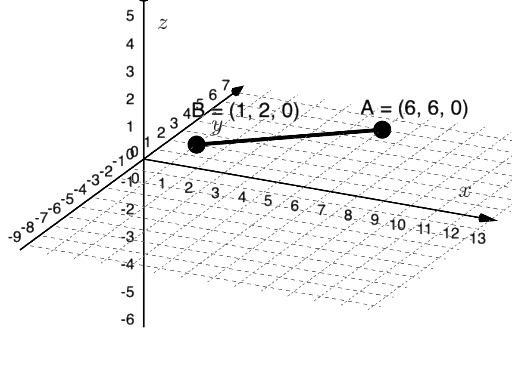
This example demonstrates how to create surfaces of revolution using GeoGebra. Key mathematical concepts include rotation, solid geometry, and functions. By using PointIn, Segment, and Surface commands, users can visually understand the process of generating surfaces of revolution. Suitable for high school mathematics education and learning.
GeoGebra Commands & Parameters
PointIn(Plane[(0, 0, 0), (1, 0, 0), (1, 1, 0)]) → BPointIn(Plane[(0, 0, 0), (1, 0, 0), (1, 1, 0)]) → ASegment(A, B) → fSurface(f, n, xAxis) → a
AI Drawing Prompt Reference
Draw a surface of revolution by first selecting two points A and B on the xy-plane, then creating a line segment f connecting these two points. Finally, rotate this line segment f around the x-axis to form a surface of revolution a.
The prompt above was compiled from the original drawing commands and is for reference only.