
Exercise 2.14 - Quick Segment Trisection
Loading the math board and drawing, please wait…
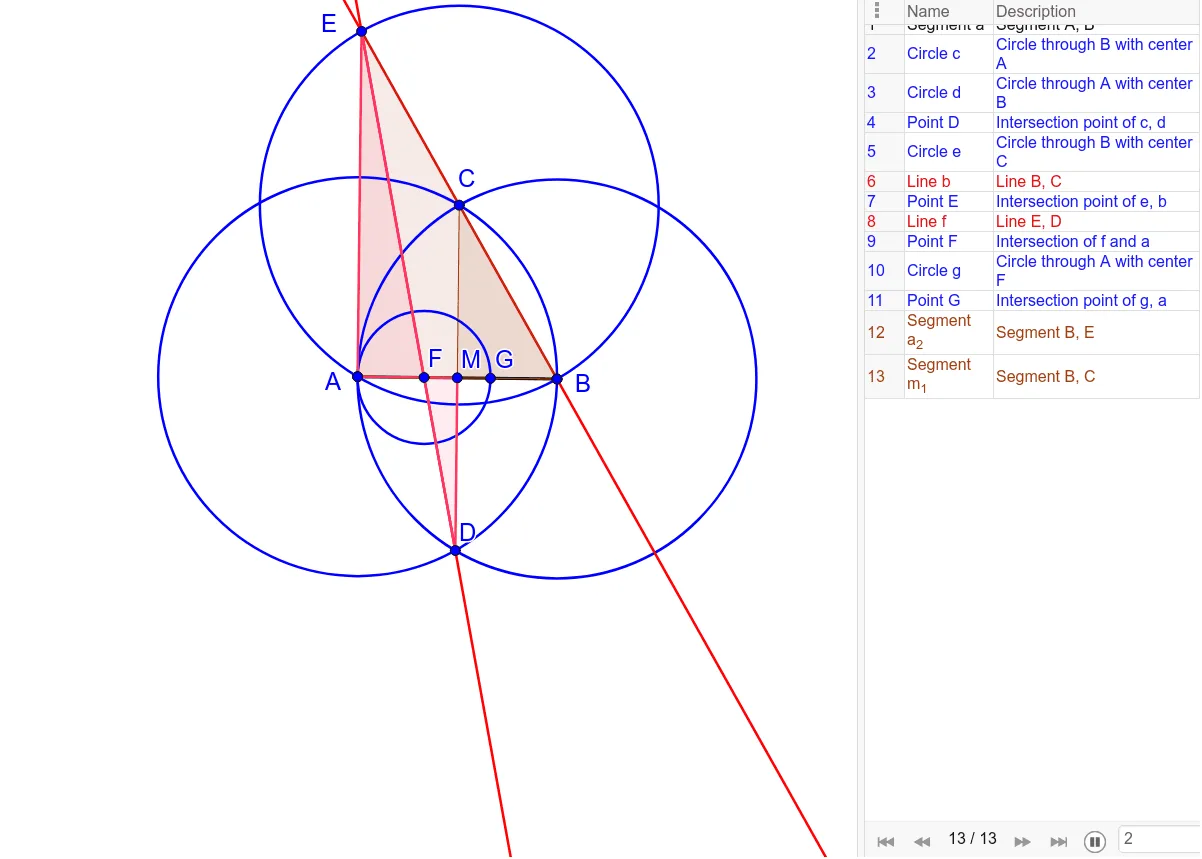
This example demonstrates how to quickly trisect a segment. Key mathematical concepts include geometric construction and coordinate geometry. It uses commands such as Segment, Circle, Intersect, Line, Midpoint, and Polygon in GeoGebra. Suitable for middle school and above students to learn geometric construction techniques.
GeoGebra Commands & Parameters
Segment(A, B) → aCircle(A, B) → cCircle(B, A) → dIntersect(c, d) → C, D, ,Circle(C, B) → eLine(B, C) → bIntersect(e, b) → E_1, ELine(E, D) → fIntersect(f, a) → FCircle(F, A) → gIntersect(g, a) → H, GMidpoint(A, B) → MPolygon(E, A, B) → t1, b_1, e_2, a_2Polygon(C, M, B) → t2, b_2, c_1, m_1Polygon(E, A, F) → poly1, f_1, e_1, a_1Polygon(F, D, M) → poly2, m, f_2, d_1
AI Drawing Prompt Reference
Draw a line segment AB, then draw two circles with A and B as diameters, find their intersection points C and D. Draw a circle centered at C, intersecting AB at E. Draw line segment BC, find its intersection with the new circle at F. Draw a circle centered at F, intersecting AB at G and H. Find the midpoint M of AB. Draw triangles EAB, CMB, EAF, and FDM.
The prompt above was compiled from the original drawing commands and is for reference only.