
rusty compass construction: moving segments and circle intersections
Loading the math board and drawing, please wait…
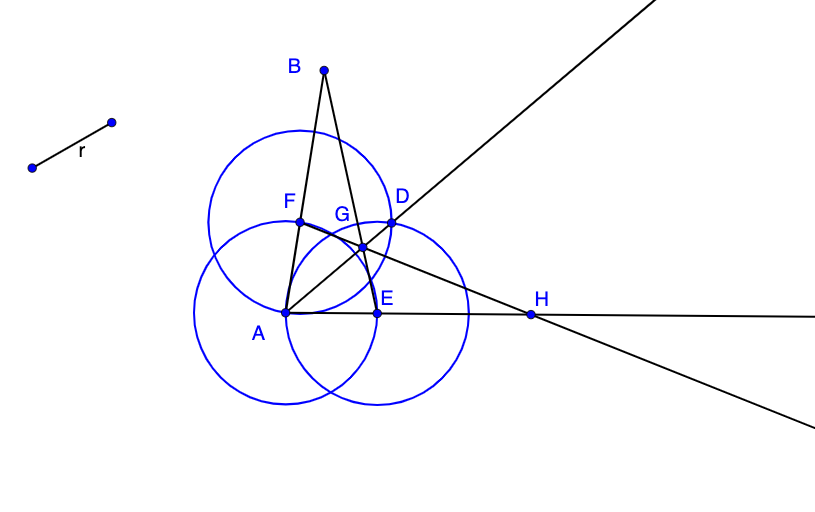
This example demonstrates how to use a rusty compass tool to move segments and find their intersections with circles. The key mathematical concepts include geometric construction, intersection of circles and lines, and coordinate geometry transformations. The construction involves GeoGebra commands such as Segment, Ray, Circle, Intersect, using objects like O, R, r, A, B, b, C, c, d, F, E, e, f, D, g, h, G, i, H. Suitable for high school students or college freshmen learning basic geometric construction and analytic geometry.
GeoGebra Commands & Parameters
Segment(O, R) → rSegment(A, B) → bRay(A, C) → cCircle(A, Segment[R, O]) → dIntersect(d, b) → F,Intersect(d, c) → E,Circle(E, Segment[R, O]) → eCircle(F, Segment[R, O]) → fIntersect(e, f, 2) → DRay(A, D) → gSegment(B, E) → hIntersect(g, h) → GRay(F, G) → iIntersect(c, i) → H
AI Drawing Prompt Reference
Create a geometric construction in the plane using points O and R to set a base segment r, and points A, B to define a segment b from A to B. From A draw a ray c passing through C. Construct a circle d centered at A with radius equal to the length of the segment from R to O. Find the intersection of circle d with segment b to obtain F, and the intersection of circle d with ray c to obtain E. Draw circle e centered at E with the same radius, and circle f centered at F with the same radius. Compute the intersection of circles e and f (take one of the two points) and label it D, then draw ray g from A through D. Draw segment h connecting B and E, find the intersection of ray g with segment h and label it G. Draw ray i from F through G, and finally find the intersection of ray i with ray c, labeled H.
The prompt above was compiled from the original drawing commands and is for reference only.