
Integrated GeoGebra Construction: Rays, Circles, and Equilateral-Style Constrain
Loading the math board and drawing, please wait…
In collections
Foundations of Geometry - Constructions
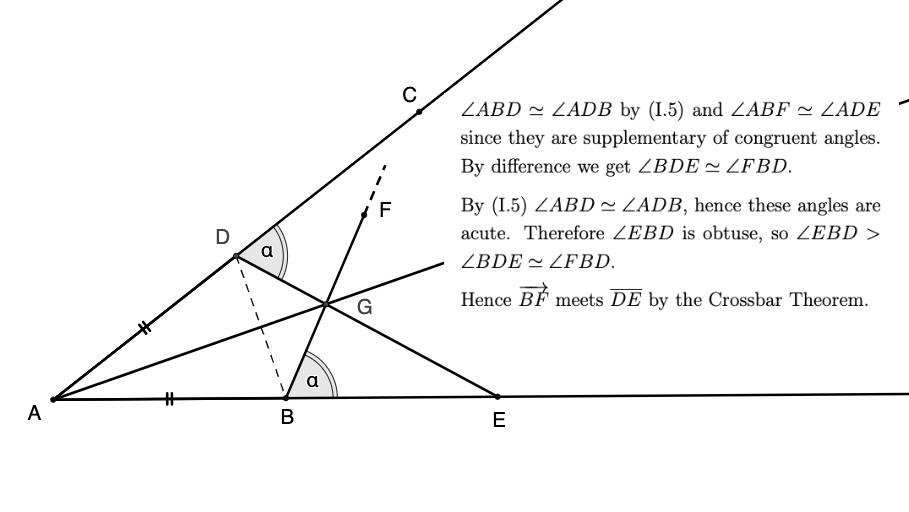
This example demonstrates how to build a structured geometric figure by combining rays, segments, circles, intersection points, and interactive angle control. By using AngleMoverCW/Angle, the construction supports controlled rotation or adjustment, helping students observe how key points and relationships change while maintaining prescribed angle or side constraints (often used to model equilateral-triangle-like structures). The underlying math concepts include geometric construction using intersection, angle constraints as parameters, and the connection to broader algebraic themes suggested by the exercise context (quadratic equations, logarithmic functions, matrices, and roots). In GeoGebra it is constructed with Ray, Segment, and Circle to create the primitive elements; Intersect to compute defining intersection points; Point to establish fixed/derived points; and AngleMoverCW plus Angle to drive the adjustable angle relationships. Labeled objects such as A, B, C, D, E, F, G, H and variables like β, γ, n, p, m, k represent the key point system and intermediate quantities. Suitable for upper-secondary to early university learners, this is ideal for teaching geometric construction, interactive constraint modeling, and linking geometry with algebraic reasoning.
GeoGebra Commands & Parameters
Ray(A, B) → fSegment(A, B) → jRay(A, C) → gCircle(A, B) → cIntersect(c, g, 1) → DSegment(A, D) → lPoint(f) → ESegment(D, E) → hAngleMoverCW(B, D, E, B, D) → i, i_2Intersect(g, i) → G_1Angle(E, D, G_1) → βAngle(E, B, G_1) → γPoint(i) → HPoint(i) → FSegment(B, F) → nSegment(F, H) → pIntersect(h, i) → GRay(A, G) → mSegment(D, B) → k
AI Drawing Prompt Reference
Create a geometric figure with multiple points, rays, segments, and circles. Start from point A, draw a ray and mark point B on it. Draw a circle centered at A with radius AB. Draw another ray from A and find its intersection with the circle to get point D. Connect segments AD and DB to form a triangle. Take another point E on the first ray and connect DE. Add an adjustable angle controller on the ray, then pick points F and H on it, and point G where the controller intersects segment DE. Connect related segments and mark the angles at D and B. The overall figure consists of rays, segments, a circle, and dynamic angle control points.
The prompt above was compiled from the original drawing commands and is for reference only.