
Geometric Construction: Exploring Relationships with Tree Diagrams and Circles
Loading the math board and drawing, please wait…
In collections
Foundations of Geometry - Constructions
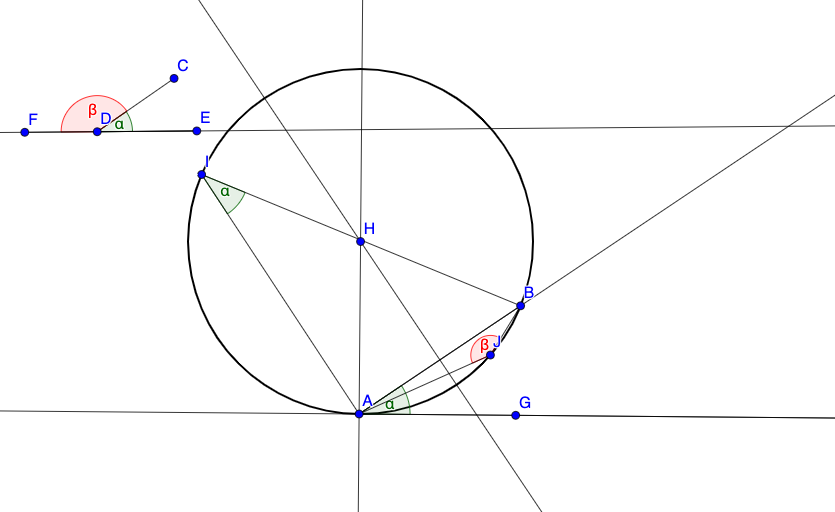
This example demonstrates how to explore geometric relationships using tree diagrams and circles. Key mathematical concepts include plane geometry, angles, circles, and loci. Construction involves GeoGebra commands such as Segment, Line, Circle, and AngleMoverCW. Suitable for middle or high school mathematics to understand geometric construction and transformations.
GeoGebra Commands & Parameters
Segment(A, B) → fSegment(C, D) → gSegment(D, E) → hLine(E, D) → iPoint(i) → FAngleMoverCW(C, D, E, A, B) → j, kPoint(j) → GLine(G, A) → lOrthogonalLine(A, j) → mLineBisector(B, A) → nIntersect(m, n) → HCircle(H, A) → cPoint(c) → ISegment(A, I) → pSegment(B, I) → qAngle(G, A, B) → αAngle(E, D, C) → βAngle(A, I, B) → γPoint(c) → JSegment(B, J) → rSegment(A, J) → sAngle(C, D, F) → δAngle(B, J, A) → εSegment(F, E) → t
AI Drawing Prompt Reference
Create a plane geometry construction showing several related segments, lines, angles, and a circle. Start with two given segments that share no direct endpoint, plus an additional segment that connects through another point; draw a line through a chosen intermediate direction and place a new point on it. From this new point, draw a line to one key endpoint, then construct a line perpendicular to that line at the key point. Also draw an angle bisector associated with the two original endpoints so that it intersects the perpendicular line at a single intersection point. Use that intersection point as the center to draw a circle passing through a specified endpoint, then mark a point on the circle and connect it back to the relevant endpoints with two segments. Include several angle measurements formed by the key points and the constructed vertex, and add the remaining segment connecting the final constructed point to the earlier segment endpoint.
The prompt above was compiled from the original drawing commands and is for reference only.